Master Python Asyncio: A Full Guide

Last updated on
Introduction
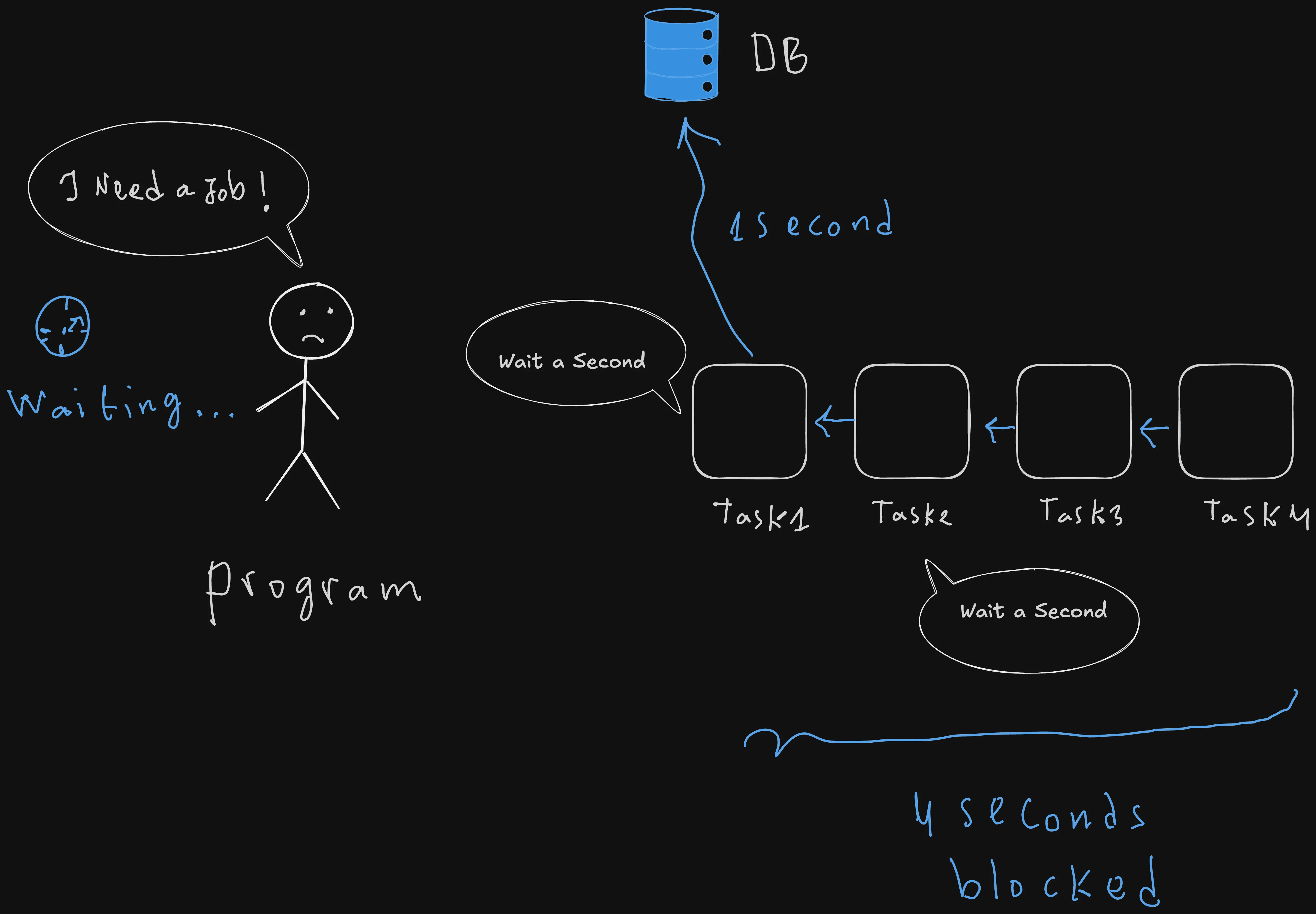
If you are not using asynchronous programming, your program is likely wasting most of its time waiting for external I/O-bound operations like network requests or database calls rather than actually processing data or handling user requirements.
In other words, your program is literally wasting time doing nothing rather than switching to another task. Asynchronous programming solves this problem by ensuring that the program isn’t blocked by I/O-bound tasks, allowing it to switch to other operations instead of staying idle doing nothing.
In this guide, we will break down how to implement this effectively in your Python projects. By the end of this tutorial, you’ll understand:
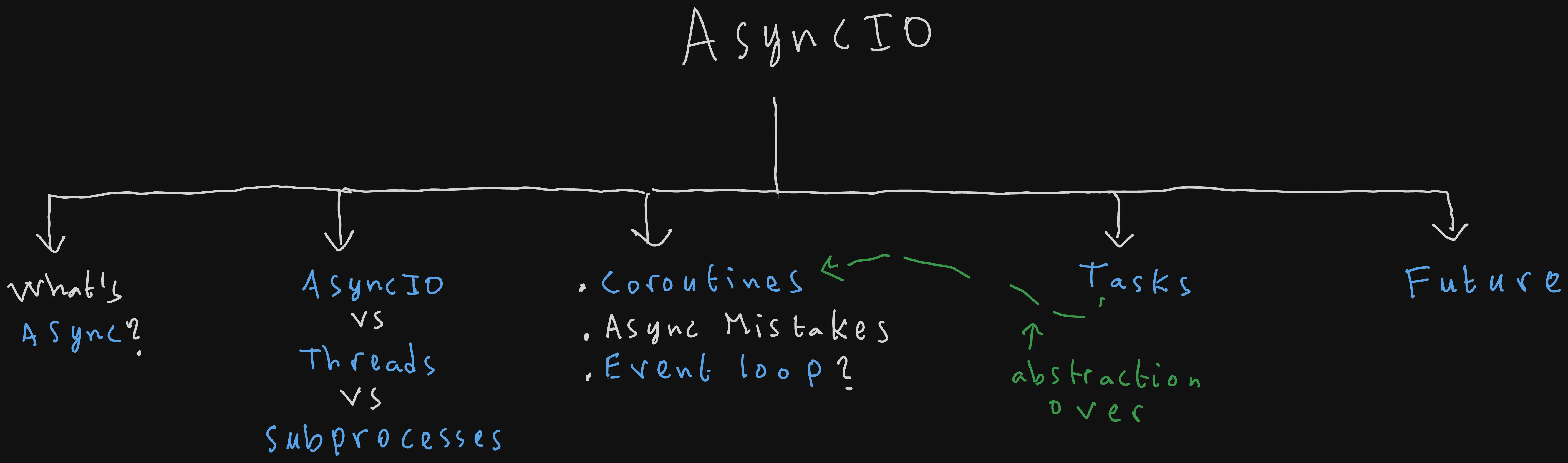
I this comprehensive in-depth article, we’re going to break asynchronous programming, and explain all you need to start using it in your daily code confidently, we will learn about:
-
What the word asynchrounous actually means and why it is the key to handle long waiting I/O bound tasks.
-
How to choose between
asyncio, threads, and subprocesses. -
The fundamentals of coroutines, including writing your first async code, identifying a common async mistake, and understanding how the event loop runs tasks concurrently.
-
How to use Tasks, ans abstraction over coroutines that allows us to schedule concurrent tasks.
-
And finally we will dimistiphy the Future low level type, which is the third type of awaitables in Python in addition to coroutines and tasks.
So without any further ado, let’s get straight into it.
Mastering Asynchronous I/O: How to Handle Waiting Tasks
So what does async even mean? And how really it does help in handling I/O bound computations?
Whatever the programming language, the framework, or the environment, when you hear about async, you should instantly think about I/O-bound tasks.
And by IO-bound tasks, i mean literally any computing task where our process/program spends most of its time waiting for data, for example:
- Reading a file from disk.
- Fetching data in the network via API calls…
- User interaction: Waiting for a user to type something on the keyboard or to click on a button.
- And so on.
Let’s say you just woke up, prepared a cup of coffee, turned on your machine, and started typing on your keyboard, chuckling and sipping coffee with every keystroke.
You soon find out, however, that your task has a dependency on a teammate. In other words, you cannot proceed until your coworker finishes their task first.
“Okay, good, let’s just take a walk in nature until John finishes the task. I’m blocked, after all. I can’t do anything.” That’s what a synchronous program would have said.
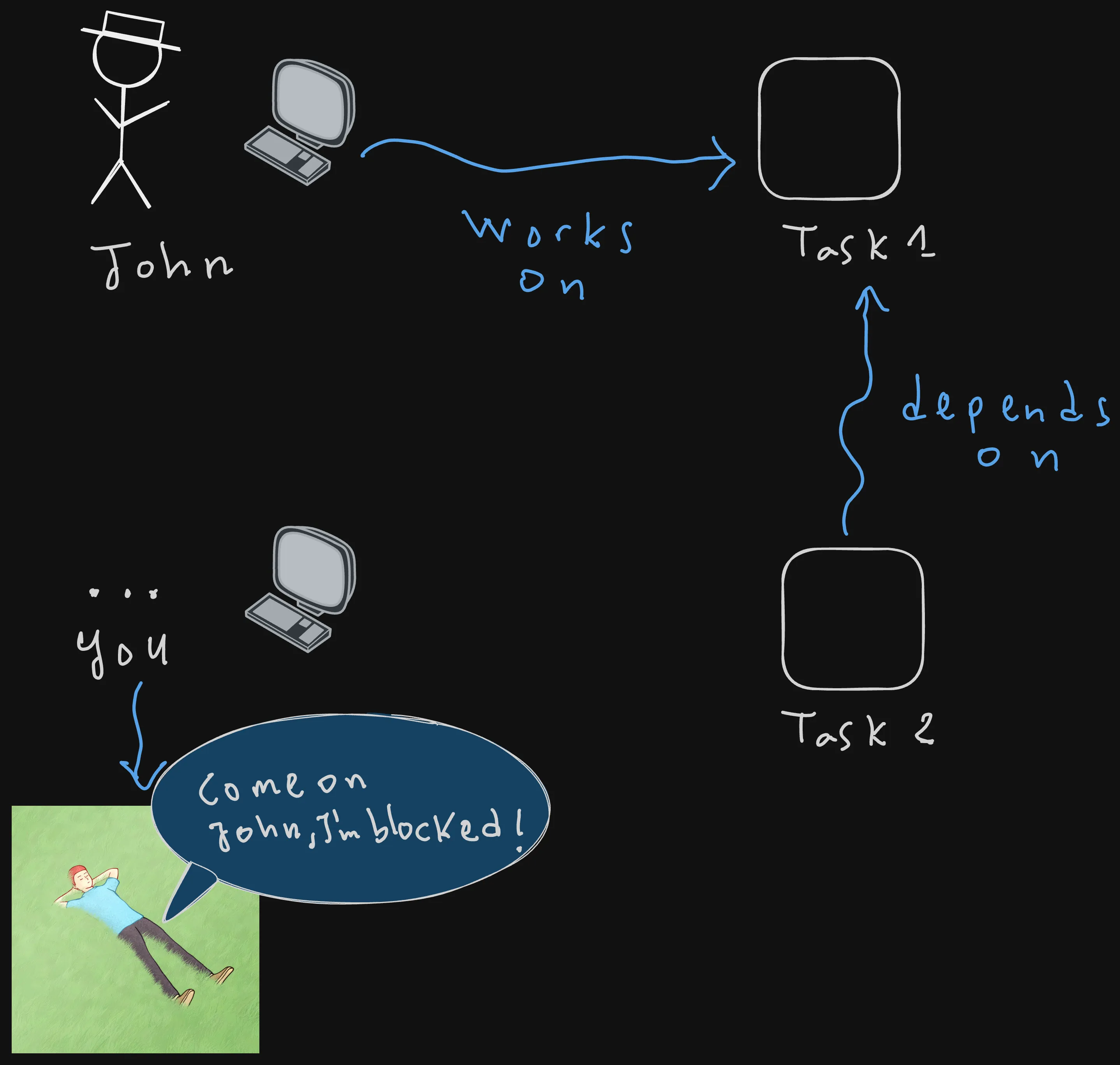
But you aren’t one. Instead of waiting for your coworker (a.k.a. the external I/O-bound task) to finish their work, you can just proceed asynchronously by switching to another task until they are done.
The same analogy can be applied to our program. If a part of the program is waiting for a record to be written to the database or a file to be saved to the disk, it should not stay idle. Instead, it can use that time to switch to other asynchronous tasks, such as fetching data from external APIs.
As you can see, async is not about executing tasks in parallel. It is all about avoiding doing nothing while our program stays idle waiting for an external I/O-bound operation to be completed. It’s about using that idle time to execute other operations.
How to Choose between Asyncio, Threads and Subprocesses
In software engineering, there is no silver bullet that works for everything and in all cases. That’s why we need to make sure that we are employing the right solution for the right use case.
Asyncio, threads and multiprocessing are three known ways to speed up a program. Here’s what each one of these three actually mean and where it exactly shines.
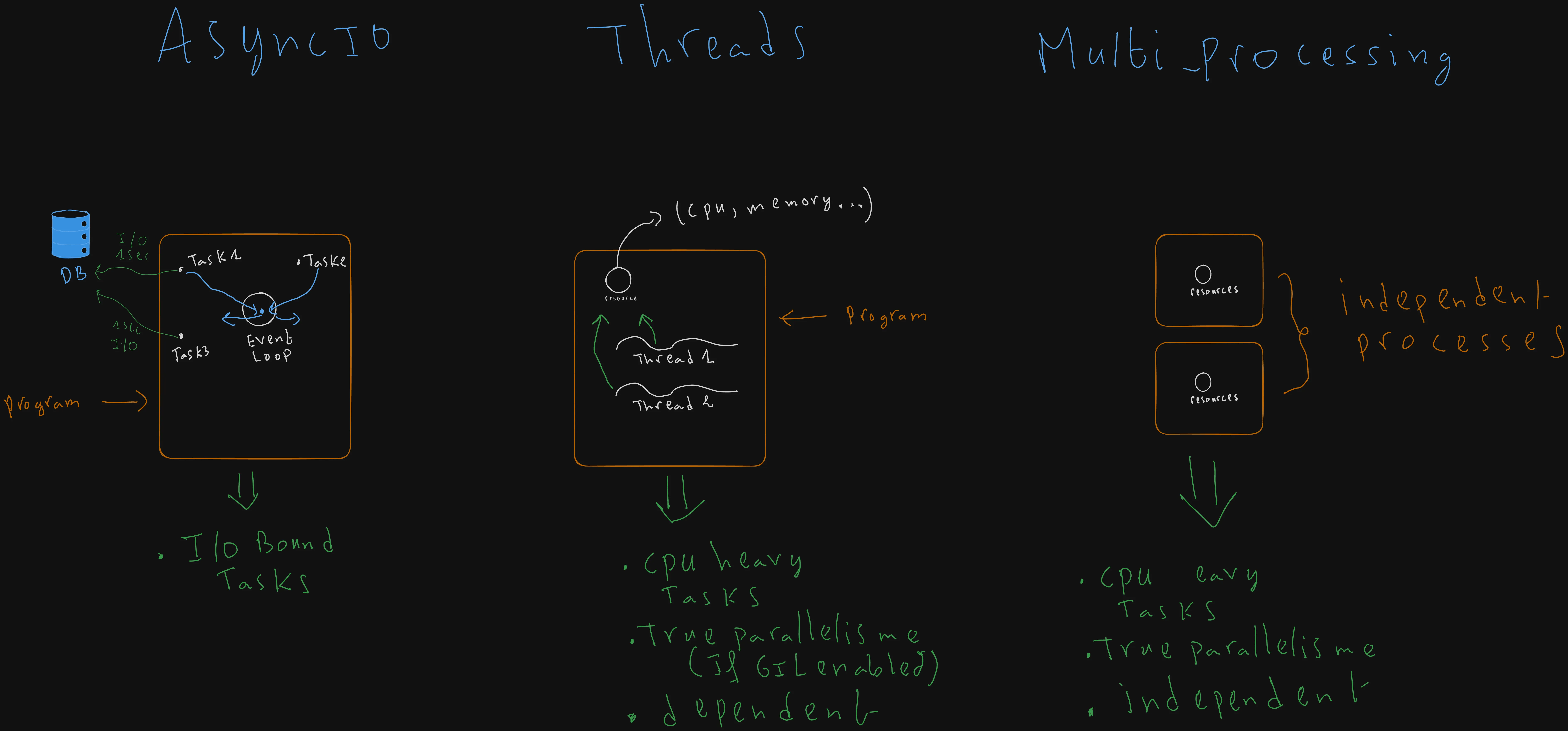
- Asyncio: As I previously said, whenever you hear the word “async,” think about I/O-bound tasks. If you think that your program will deal with a lot of external systems such as databases, file system operations, or network requests, then asyncio is your best choice.
- Threads: Use them for parallel (concurrent if GIL enabled) tasks that share data with minimal CPU use.
- Threads are not really parallel in Python because of the Global Interpreter Lock (GIL). Which is a mutex ensuring that only one thread is executing python bytecode at a time
- In the latest versions of Python, they introduced a free-threaded build, but it’s not enabled by default for compatibility reasons.
- Multiprocessing: Unlike threads, each process has its own instance of the Python interpreter. This means you can truly use 100% of your multi-core processor, which is true parallelism.
Note that subprocesses cost more memory as each has its own memory and instance of the Python interpreter, but despite that inconvinient, the speed gain and isolation pays for the cost, for example if one sub process crashes it won’t affect the others at all.
Your First Async Code
Getting Started
Now that we understood the importance of asynchronous operations, let’s write our first async code:
async def main():
    print("Start of main coroutine")

main()
To declare an async function, we use the built-in async keyword.
Adding async in front of a function transforms it into an async function or what’s called a coroutine.
Trying to run the code above will result in printing the following runtime warning:
RuntimeWarning: coroutine 'main' was never awaitedYou can notice as well that the main function’s code never executes as well. Nothing gets printed except the warning.
Hmm, interesting. Let’s try to print what’s returned by the async main function
async def main():
    print("Start of main coroutine")

print(main()) # --> <coroutine object main at 0x10711bf40>
We can observe that the async function main returned a coroutine object.
From this, we can conclude that when a function is defined with the async keyword, calling it does not execute the code immediately.
Instead, it returns a coroutine object.
I guess that you’re now wondering, what’s exactly is a coroutine object, right?
Well, a coroutine object is one of the three awaitable objects in Python: coroutines, tasks, and futures.
To await it, we need to import asyncio and wrap the main coroutine call with its run method.
“asyncio” is a built-in Python library, so there is no need to install anything.
import asyncio
async def main():
  print("Start of main coroutine")

asyncio.run(main())
We usually only use the run method at the top level of our code because it does two things: start the async event loop and await the passed coroutine main()
Awaiting Sequentially: When Async Acts Like Sync
Let’s declare another coroutine called fetch, which simulates an I/O-bound task. It stops execution for 2 seconds using the asyncio.sleep method and returns a 200 success code.
As we can’t call the fetch coroutine without awaiting it, we need to use the await built-in keyword, which can only be used inside async functions.
So in the main coroutine, await the fetch call and get its result, then print it.
import asyncio
async def fetch():
   await asyncio.sleep(2) # 2 seconds delay, simulates I/O operation.
   return 200

async def main():

  print("Start of main coroutine")
  result = await fetch()
  print("result: {result}")

asyncio.run(main())
Output:
Start of main coroutine
result: 200
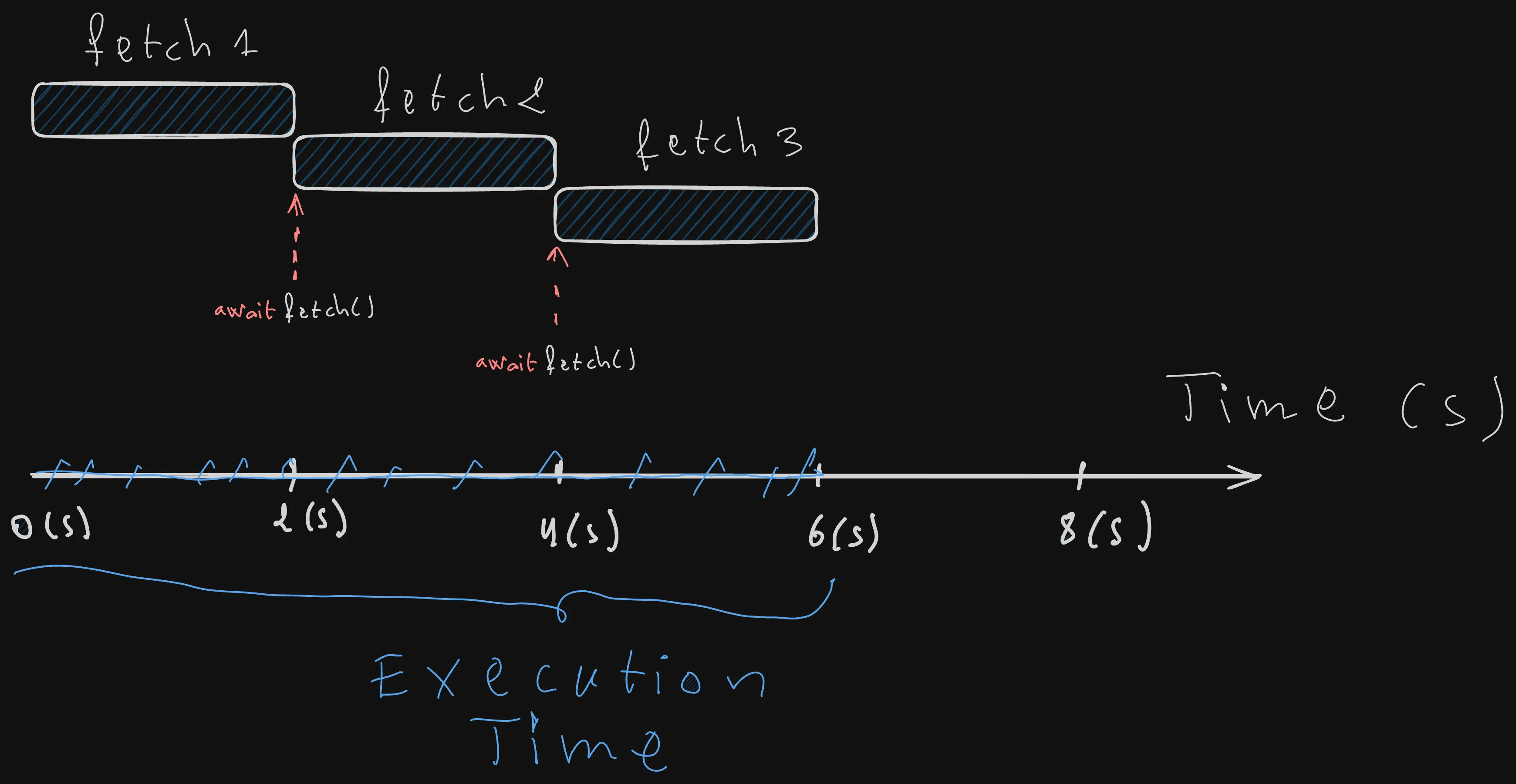
The main coroutine prints first, the program pauses for 2 seconds, and then the fetch function executes.
Let’s now try to call the fetch coroutine three times in main, retrieve the result of each call, and then print them all.
import asyncio
import time

async def fetch():
   await asyncio.sleep(2)
   return 200


async def main():

  start_time = time.perf_counter()

  print("Start of main coroutine")

  start_time = time.perf_counter()
  result1 = await fetch()
  result2 = await fetch()
  result3 = await fetch()
  end_time = time.perf_counter()
  duration = end_time - start_time
  print(f"The time took {duration} to execute")

  print(f"results: {[result1,result2,result3]}")

asyncio.run(main())
 Output:
Start of main coroutine
The time took 6.003185832989402 to execute
results: [200,200,200]
There is no performance gain here yet. The fetches are executing one after another. We are essentially waiting for each I/O task to finish before starting the next one, which defeats the whole purpose of being asynchronous.
In other words, we are not taking advantage of our event loop here.
Before talking about how we can run our coroutines concurrently, it’s important to first understand the gist of it, or the component that makes that possible, which is the event loop.
What is the event loop?
Asynchronous execution of our program allows us to use the wasted waiting time of I/O-bound operations by switching from one blocked task to another until all tasks are executed. But how is that achieved in practice by asyncio?
That’s where the Event Loop comes in.
The asyncio.run method creates what’s called an event loop.
asyncio.run(main())
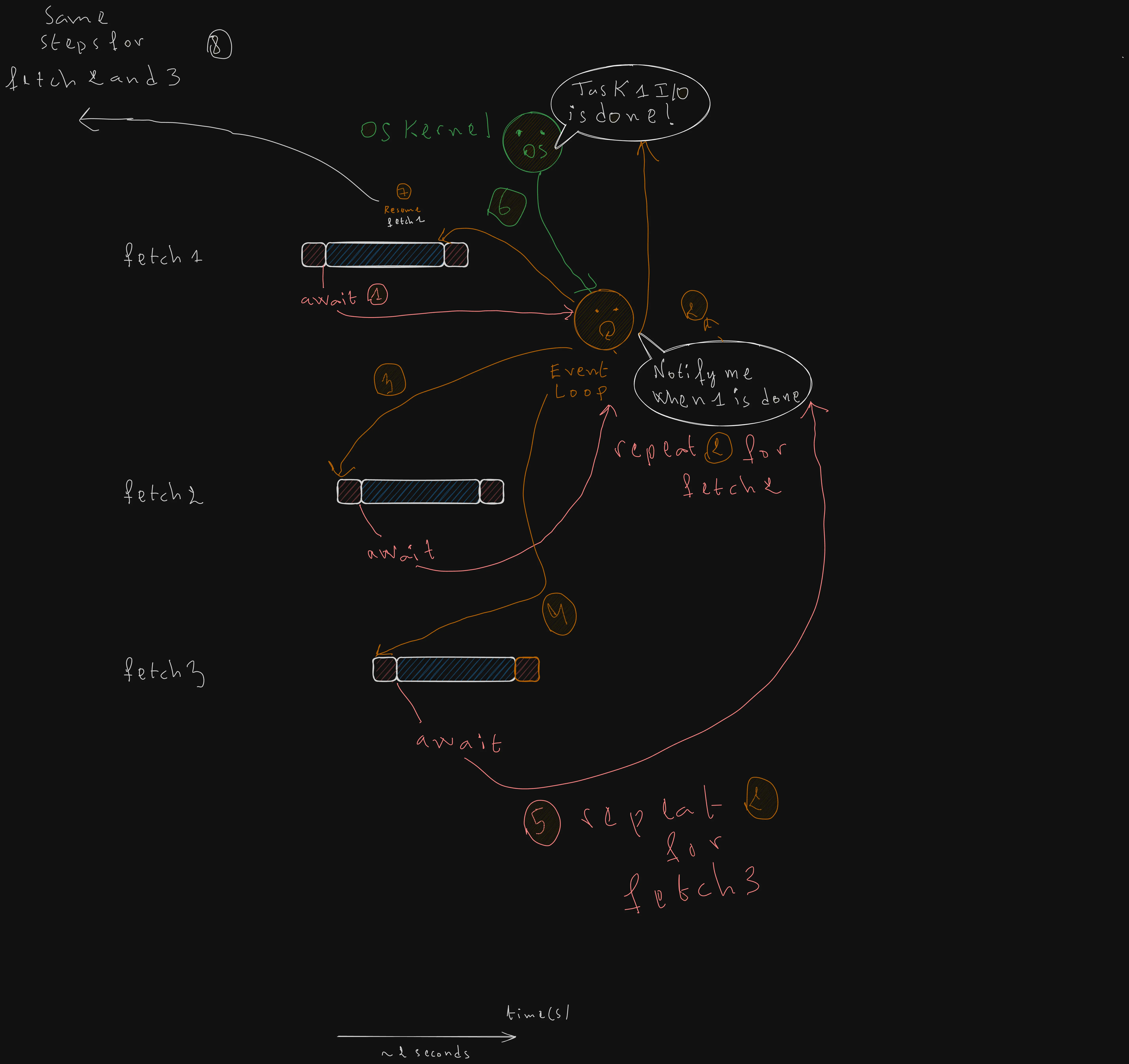
The way i like to think of the event loop is that it acts as the orchestrator that tracks all the async coroutines and works in three steps as follow:
- Execution Start: When you call “asyncio.run(main()),” the event loop starts and maintains a list of all the tasks that need to be executed. At any given moment, the loop is running exactly one task.
- The Yield Point: The loop executes a task until it hits an “await,” which is a signal that means that the task is waiting for an external I/O bound operation.
- The Switch & Resume: Instead of waiting, the loop immediately switches to another ready task. It keeps track of the “waiting” tasks in the background and resumes them exactly where they left off the moment their I/O operation is finished.
Scheduling Coroutines: An Introduction to Tasks
Creating Tasks manually
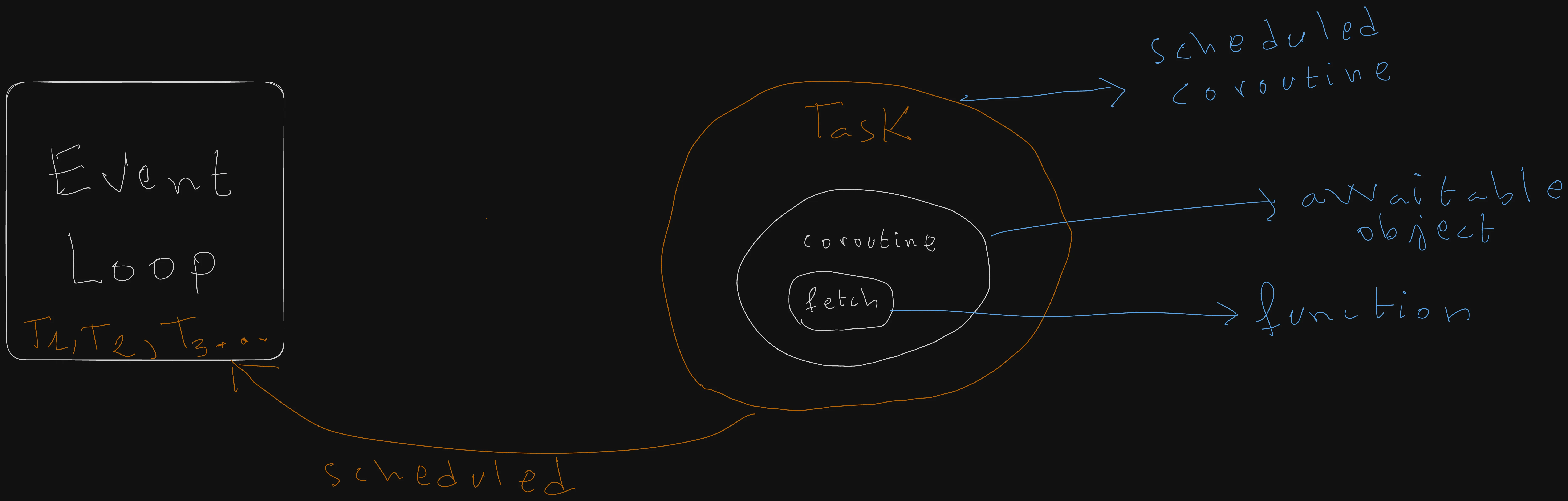
By default, asyncio does not schedule coroutines in the event loop; we need to wrap each coroutine object in a Task. Once wrapped, the event loop manages its execution immediately, allowing the program to switch between tasks while waiting for I/O operations.
Let’s wrap the fetch calls from the previous example into tasks and execute the code:
async def main():

  start_time = time.perf_counter()

  print("Start of main coroutine")

  start_time = time.perf_counter()
  task1 = asyncio.create_task(fetch())
  task2 = asyncio.create_task(fetch())
  task3 = asyncio.create_task(fetch())
  result1 = await task1
  result2 = await task2
  result3 = await task3
  end_time = time.perf_counter()
  duration = end_time - start_time
  print(f"The time took {duration} to execute")

  print(f"results: {[result1,result2,result3]}")

asyncio.run(main())
Output:
Start of main coroutine
The time took 2.001712833996862 to execute
results: [200, 200, 200]
This time, the total execution is only 2 seconds, which matches the duration of the longest-running I/O task.
What happens here is that, the event loop start by executing the first fetch, and then at the await point the control gets back to the event loop, at that moment the IO operation continues in the background, the event loop listens for it’s completion event while instantly moving to the next fetch, the same things repeats with the second fetch and then the third.
When one IO task completes, the event loop wakes up the concerned task, the task continue its execution and then returns.
All of this results in avoiding making the program stay idle and wait for only one thing, and instead it waits for 3 things in parallel, which results in reducing the execution time from 6 seconds to only 2 seconds,
Which corresponds to the execution time of the longest running task.
The Gather method
Creating tasks manually for each coroutine can be tidiuous with time, that’s why the “asyncio.gather” method exists.
The “gather” method accepts any number of coroutine objects or “future types” and returns what’s known as an “asyncio.Future” type, which is one of the three awaitable types in Python.
We will talk more about asyncio.Future later, all you need to understand about it now is that its awaitable as coroutines and tasks.
async def main():

  start_time = time.perf_counter()

  print("Start of main coroutine")

  start_time = time.perf_counter()
  results = await asyncio.gather(fetch(),fetch(),fetch())
  end_time = time.perf_counter()
  duration = end_time - start_time
  print(f"The time took {duration} to execute")

  print(f"results: {results}")
Output:
Start of main coroutine
The time took 2.0019387080101296 to execute
results: [200, 200, 200]
Just like before, the execution only takes 2 seconds. This proves that the three “fetch” calls ran concurrently, rather than being blocked by sequential I/O waiting.
By default, asyncio.gather does not stop other tasks if one fails. Even if an exception is raised in one of the tasks, the remaining ones continue running in the background.
To handle these errors correctly without crashing the program, you can set return_exceptions=True to treat exceptions as returned values instead of raised errors. You can then iterate through the results and handle both the exceptions and the successfully returned results as needed.
import asyncio

async def fetch_success():
    await asyncio.sleep(1)
    return 200

async def fetch_fail():
    await asyncio.sleep(1)
    raise ValueError(500)

async def main():
    # With return_exceptions=True, the program won't crash
    results = await asyncio.gather(
        fetch_success(),
        fetch_fail(),
        return_exceptions=True
    )

    for res in results:
        if isinstance(res, Exception):
            print(f"Task failed with: {res}")
        else:
            print(f"Task succeeded with: {res}")

asyncio.run(main())
Output:
Task succeeded with: Success!
Task failed with: 500 (Internal Server Error)
When using **gather,** returning exceptions as values instead of raising them makes error handling much easier. As you can see from the logs, Gather did not stop the first task even though the second one failed.
Task Group
In Python 3.11, TaskGroups were introduced as a safer and more structured way to manage multiple tasks.
The biggest advantage of TaskGroup is what’s known as structured concurrency.
In other words, if one task in the group fails, the “TaskGroup” automatically cancels all the other ones.
This prevents uncanceled tasks, or “zombie tasks,” from wasting resources when running in the background.
async def main():
  tasks = set()


  print("Start of main coroutine")

  start_time = time.perf_counter()
# The context manager ensures all tasks finish before exiting the block
  async with asyncio.TaskGroup() as tg:
      for _ in range(3):
          task = tg.create_task(fetch())
          tasks.add(task)

  end_time = time.perf_counter()
  duration = end_time - start_time

  # At this point, TaskGroup guarantees that all tasks have     completed successfully.
  results = [ task.result() for task in tasks]

  print(f"The time took {duration} to execute")

  print(f"results: {results}")

asyncio.run(main())
Start of main coroutine
The time took 2.001078375033103 to execute
results: [200, 200, 200]
Note that we are tracking the running tasks in a
tasksset. This is done on purpose to prevent the garbage collector from cleaning up our tasks mid-execution.
The “async with” block is a Python feature known as an “async context manager.”
It acts as a barrier. The program will not proceed to the results = ... line of code until every task created within that group has either finished successfully or raised an exception if one of them fails.
This replaces the boilerplate code you would otherwise have to write manually to manage task lifecycles when using asyncio.gather.
Bonus Information About Task Group
If multiple tasks fail inside a group, Python does not throw one error, but it throws an “ExceptionGroup.” You can handle it using the except* syntax.
import asyncio

async def fail_fetch():
  await asyncio.sleep(1) # simulate I/O-bound task
  raise ValueError(500)

async def main():
  try:
    async with asyncio.TaskGroup() as tg:
        tg.create_task(fail_fetch())
        tg.create_task(fail_fetch())
  except* ValueError as eg:
    for e in eg.exceptions:
        print(f"Caught a value error: {e}")

asyncio.run(main())
Output:
Caught a value error: 500
Caught a value error: 500
Future
Now that we covered coroutines and tasks, let’s look at the third type of awaitable: the Future.
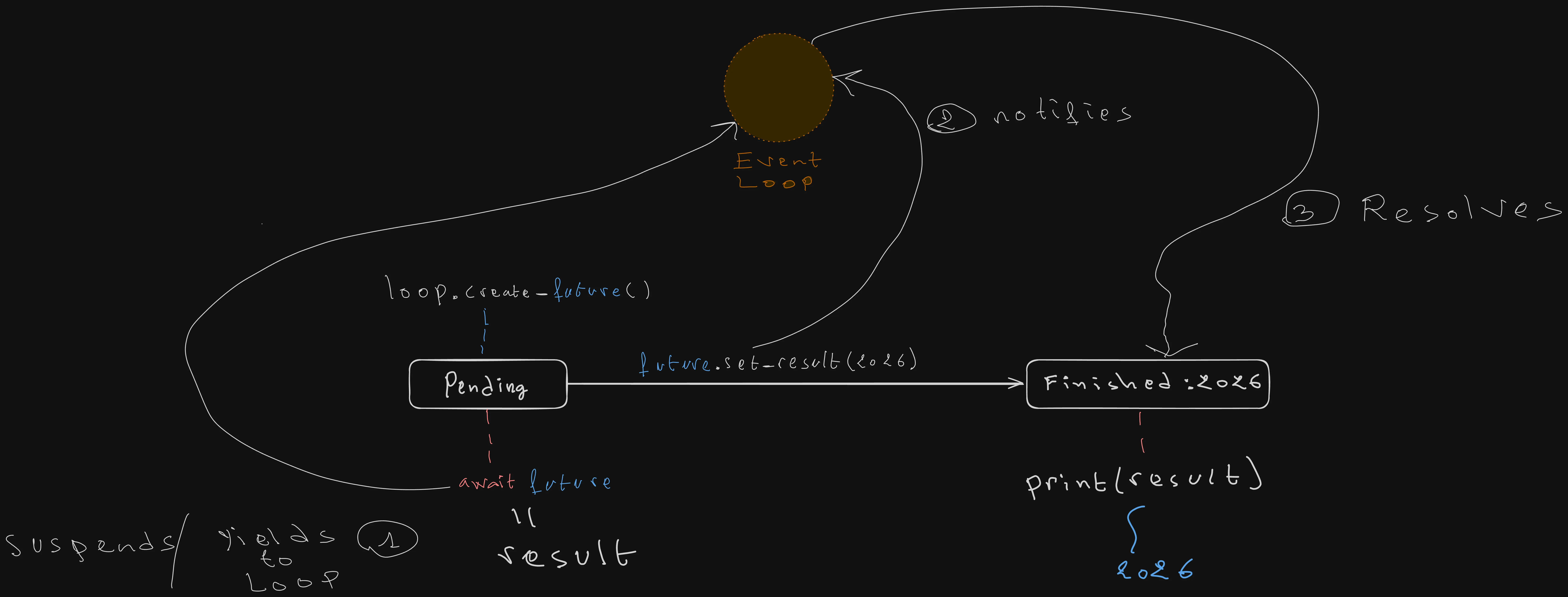
While you rarely use these at the application level, they are essential low-level objects representing a result that hasn’t arrived yet. Think of a Future as a “promise” or a placeholder for a value that will be set later.
A Future is often used to bridge the gap between low-level, callback-based code and modern async/await syntax. When you await a future, your code pauses until a value is manually pushed into it, even if the background work that pushed the value continues to run.
import asyncio
import time

async def provide_data(future, value):
    await asyncio.sleep(2)
    # The Future is fulfilled here
    future.set_result(value)

    print("Future result set! Doing some background cleanup now...")
    await asyncio.sleep(5)

async def main():
    start_time = time.perf_counter()

    loop = asyncio.get_running_loop()
    future = loop.create_future()

    # Schedule the provider
    asyncio.create_task(provide_data(future, 2026))

    # We wait specifically for the result, not the whole task
    result = await future
    print(f"Received the future's result: {result}")
    end_time = time.perf_counter()
    duration = end_time - start_time
    print(f"The program is executed in {duration} seconds")

asyncio.run(main())
In the above example, we are doing the following:
We first retrieved the current event loop object, and then we created a future object that is tied to it.
    loop = asyncio.get_running_loop()
    future = loop.create_future()
You can’t just create a future object that functions alone independently, a future object needs an event loop to exist.
The main function is running inside an event loop that we created when we used asyncio.run function, and then we passed it the main coroutine object main().
After that we passed the future object, along with the value that we want to set it to it in the future to a provide_data coroutine, which does the following:
- Waits for an IO-bound operation for 2 seconds.
- Set the future result to 2026.
- And then sleep for another 5 seconds
Of course a coroutine alone is just an bare awaitable object, we need to create a task from it to schedule it to run concurrently in the event loop.
Now, the interesting part, we won’t await for the task itself but for the future object. In other words, we don’t care about whether the task has finished executing or not, all that matter to us is that the future object is resolved and set to a value by the task.
So the program will only take 2 seconds to run, as the provide_data task sets the future value after only two seconds, and then continues waiting for another IO-bound operation.
The tasks never finish executing as our program does not care about it, as long as the future object’s result is set, the event loop gives back the control to our program while returning the result into it.
Output:
Future result set! Doing some background cleanup now...
Received the future's result: 2026
The program is executed in 2.0018573330016807 seconds
You can notice that the program took only 2 seconds to execute, it didn’t pause for 7 whole second waiting for the whole task to execute, as we just awaited for the future value itself not the whole task
Summary
Declaring a coroutine
async def main():
...- Calling it does not run the code immediately — it returns a coroutine object.
- A coroutine must be awaited, or wrapped in
asyncio.run()or a Task, to actually execute.
Running the top-level coroutine
asyncio.run(main())- Starts the event loop and awaits
mainuntil it completes. - Use it once, at the top level of your program.
Awaiting sequentially
result1 = await fetch()
result2 = await fetch()- Each
awaitblocks until that call finishes before starting the next one. - This runs like synchronous code — no concurrency is gained.
Creating tasks manually
task1 = asyncio.create_task(fetch())
result1 = await task1- Wrapping a coroutine in a Task schedules it on the event loop immediately.
- Create all the tasks first, then await them, to actually run them concurrently.
asyncio.gather
results = await asyncio.gather(fetch(), fetch(), fetch())- Runs multiple coroutines concurrently and collects their results, in order.
return_exceptions=Trueturns a raised exception into a returned value instead of crashing the whole batch.
TaskGroup
async with asyncio.TaskGroup() as tg:
    for _ in range(3):
tg.create_task(fetch())- Waits for every task in the group to finish before the block exits.
- If one task fails, all the others in the group are automatically canceled — structured concurrency.
- Multiple failures are raised together as an
ExceptionGroup, handled withexcept*.
Future
future = loop.create_future()
future.set_result(value)
result = await future- Represents a result that hasn’t arrived yet — a low-level placeholder, rarely used directly at the application level.
- Awaiting a future pauses only until its result is set, not until the whole task that sets it finishes.
Conclusion
So that’s basically all you need to get started with asynchronous programming in Python. We covered coroutines, tasks, future, how the event loop is used to manage and orchestrate concurrent running async jobs with all the necessary nitty-gritty details that you need to get you started.
Despite covering all of that, there is an important thing that we didn’t mention yet.
As your application grows and the number of concurrent jobs increases, you may encounter race conditions because they all share the same process memory space.
Race conditions occur when multiple asynchronous tasks attempt to access the same variable simultaneously. Consider a “balance” variable accessed by concurrent debit and credit functions:
- The credit function reads the balance as 100.
- The debit function reads the balance as 100.
- The credit function adds 10, updating the balance to 110.
- The debit function subtracts 10 from the original value it read (100), updating the balance to 90.
credit function -> balance: 100, newBalance: 110
debit function  -> balance: 100, newBalance: 90 (Overwrites the credit function's modification!)
As illustrated, the debit function overwrote the credit function’s update. This is a classic example of a race condition that leads to data corruption. However, race conditions can be even more severe; certain categories can lead to memory errors that cause the entire process to crash.
Race conditions are typically handled using semaphores and mutexes. In the next article, we will explore asyncio synchronization primitives, including Locks, Semaphores, BoundedSemaphores, Events, Conditions, and Barriers.
Enjoyed this article?
I'm currently open to new roles, remote-first or international. If something resonated or you'd like to collaborate, I'd love to hear from you.

This article was originally published on https://sidaliassoul.com/blog/master-python-asyncio-comprehensive-guide/. It was written by a human and polished using grammar tools for clarity.