Cet article n'est pas encore disponible en français. Vous lisez la version anglaise.
Python Conditional Statements: If-Else, Expressions, and Match-Case

Dernière mise à jour le
Introduction
Most of programs don’t execute all of their instructions! thanks to conditional branching statements, programs can make decisions about which code to execute based on the user input, the current state of the program, or the data they’ve already processed.
In this article, you’ll learn how Python makes those decisions using if, elif, else, conditional expressions, and the match statement.
If Statement
Conditionals such as if statements allow us to select which block of code to execute based on a bunch of conditions.
Let’s say that we want to print the priority of a task based on a positive integer value rank
The code below prints “High” when rank is equal to 0, and when it’s not the program skips the block within the if statement condition, so nothing gets printed.
rank = 0 # Change to any other value, to skip the code block within the `if` statement
if rank == 0:
    print("High") # <-- This block gets selected
We can add a contrary case, or a case when the rank is different than 0 using the else keyword.
rank = 0 # Change to anything else, to make the program select the second branch (else side).

if rank == 0:
    print("High")# <-- only this block gets selected
else:
    print("Low")
The rank == 0 condition gets evaluated first, if it’s equal to True the block within the if statement executes and the block within the else keyword gets ignored.
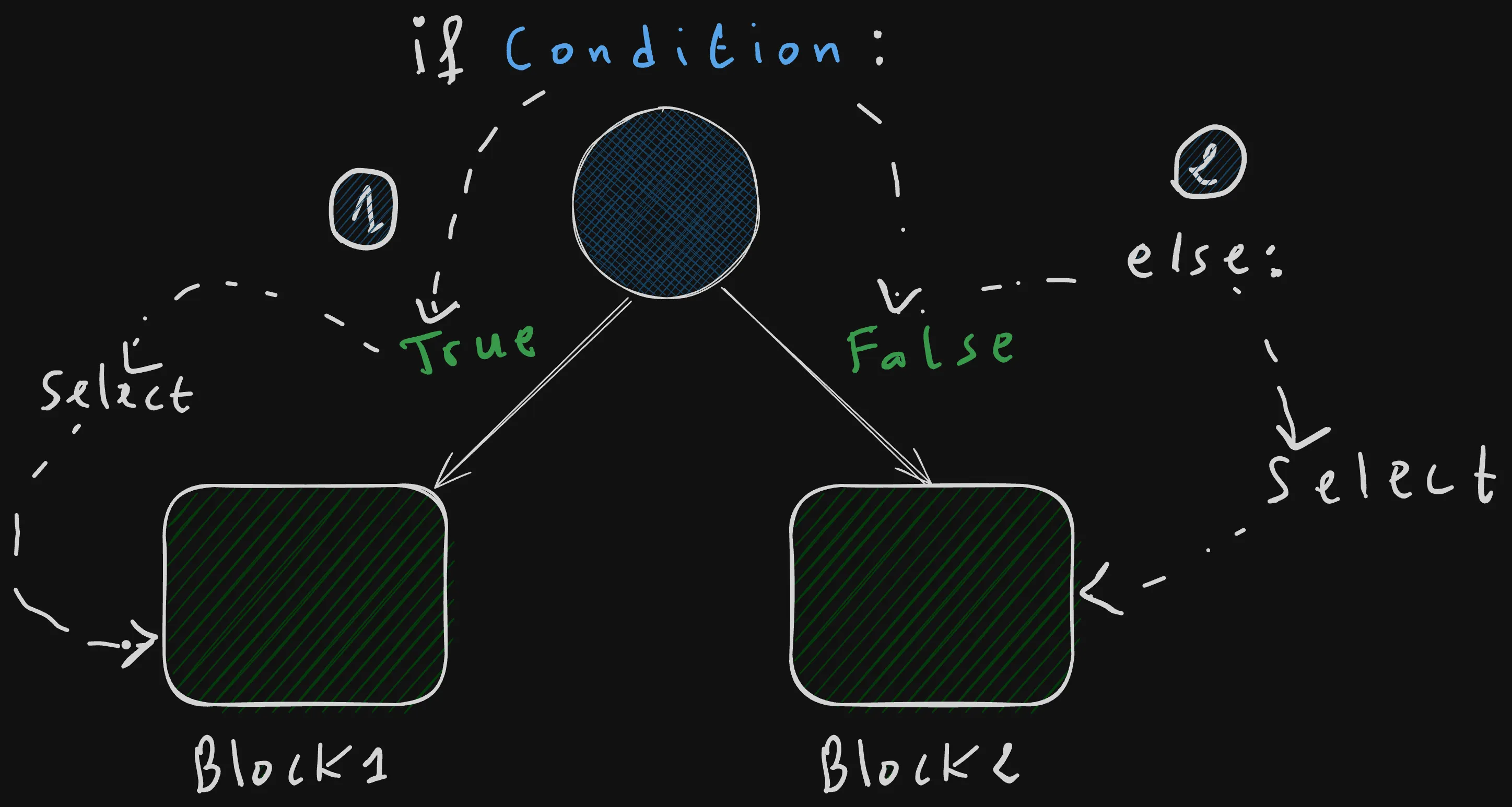
If we wanted to evaluate other cases such as when the rank is equal to 1, we can use elif which is a shorthand for else if, followed by a condition.
For example, here we check wether the rank is equal to 1, before moving to the else case the program evaluate all the elif cases first.
rank = 0 # Change to 0 or 1, or anything else to execute other branches.

if rank == 0:
    print("High")# <-- only this block gets selected
elif rank == 1: # <-- "elif <condition>" stands for "else if <condition>"
    print("Medium")
else:
    print("Low")
Only one branch gets executed in a single program run, other branches are skipped.
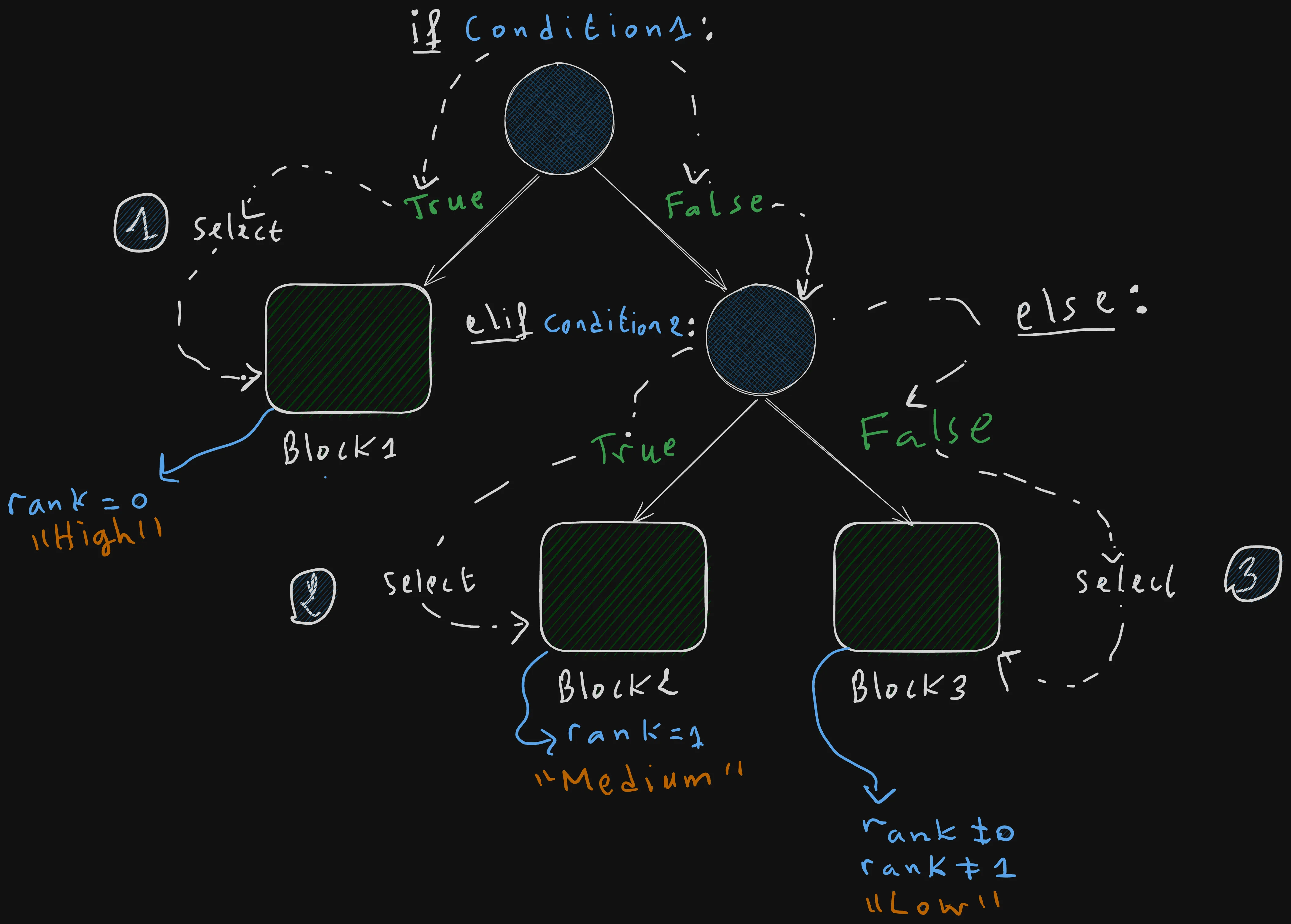
You can add as many elif branches as necessary.
rank = 0 # Change to 0,1,2 or 3, or anything else to execute other branches.

if rank == 0:
    print("High")# <-- only this block gets selected

elif rank == 1:
    print("Medium")
elif rank == 2:
    print("Medium good")

elif rank == 3:
    print("Medium less good")
else:
    print("Low")
Conditional Expression
Another way for writing conditions in Python is by using the ternary expression.
A conditional expression is a one-liner way to write an if-else statement that evaluate to a specific value.
result = true_value if condition else false_valueThe above expression reads as follow:
If the condition is true, return the true_value, else return the false_value
For example, Let’s convert our previous if-else statement to a one-liner conditional expression.
rank = 0
if rank == 0:
    print("High")# <-- only this block gets selected
else:
    print("Low")
The above code is equivalent to:
rank = 0
label = "High" if rank == 0 else "Low"
print(label)
The conditional expression reads as: If rank is equal to zero return “High”, else return “Low”.
Unlike a noraml if statement the
elseside is required in a conditional expression
Match Case Statement
rank = 0
match rank:
    case 0:
        print("High")
    case 1:
        print("Medium")
    case _:
        print("Low")
The _ wild card is equivalent to an else in an if statement.
The match statement is more powerful than an ordinary if-else statement or a switch-case one that you may have encounter in other languages.
It can be used to match complex structures and patterns.
For example, let’s say that we have a point in space defined with its x, y coordinates.
point = [4, 3] # This creates a list of two elements in Python.
# The first element is the x coordinate of the point and the second one is the y coordinate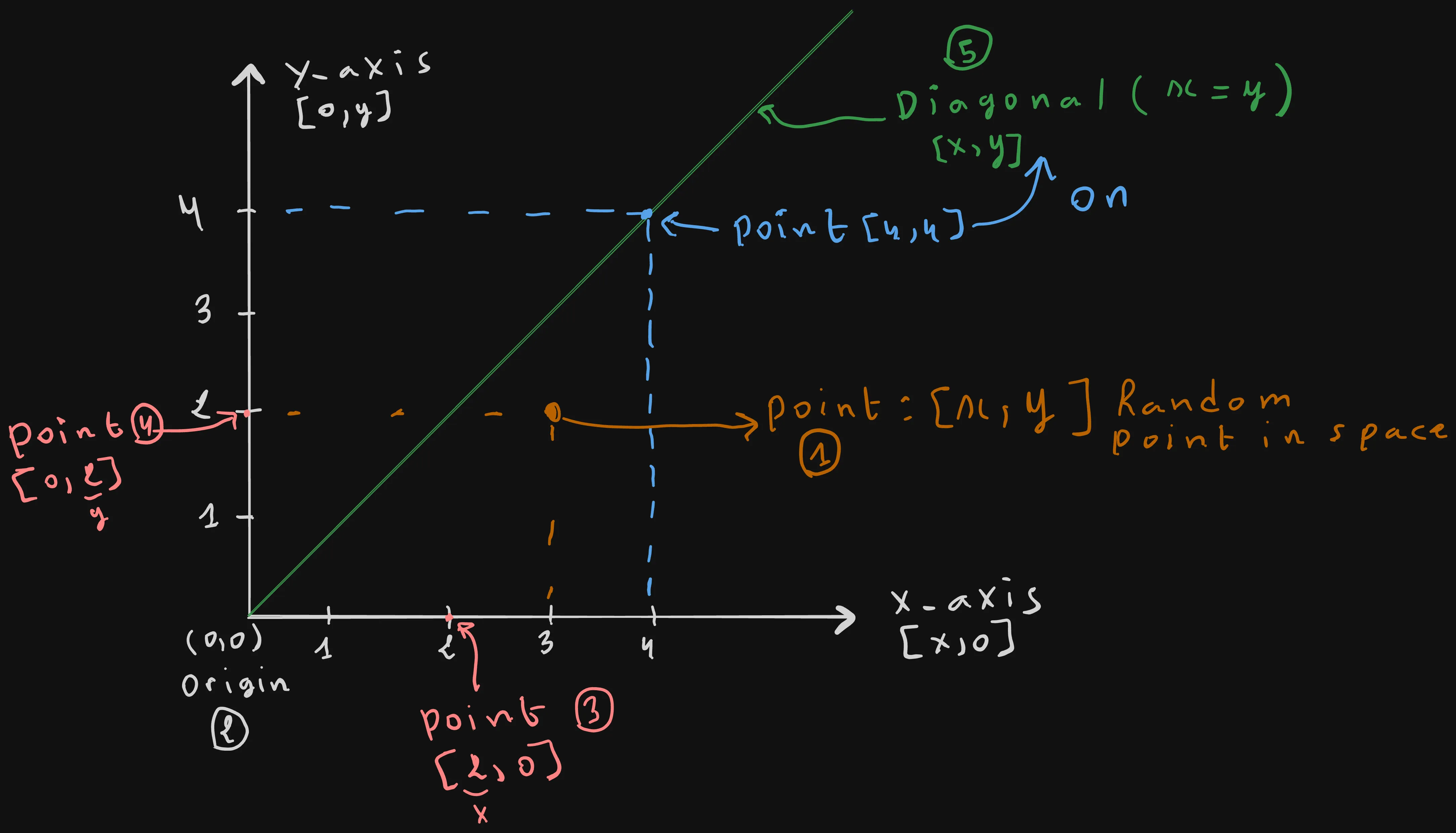
Using a match statement we can match complex patterns such as:
- Any random point
[x,y]defined with its coordinates x,y. - The Origin Point:
[0, 0](The intercection of the x-axis and the y-axis). - Any point on the X-axis
[x, 0](y == 0). - Any point on the Y-axis
[0,y](x == 0) - Any point on the diagonal line [x, y] where (x == y).
point = [4, 4]

match point:
    case [0, 0]: # <--- (1)
        print("Origin")

    case [x, 0]: # <-----(3)
        print(f"Point at the X-axis, at coordinate x = {x}")

    case [0, y]: # <----- (4)
        print(f"Point at the Y-axis, at coordinate y = {y}")

    case [x, y] if x == y: # <---- (5)
        print(f"Point is on the diagonal line because x ({x}) equals y ({y})")


    case [x, y]: # <----- (2)
        print(f"General point in space at coordinates ({x}, {y})")
Summary
if, elif, else
if condition:
    ...
elif another_condition:
    ...
else:
...- Evaluate conditions from top to bottom.
- The first condition that evaluates to
Trueis executed. - Only one branch executes during a program run.
- You can have as many
elifbranches as needed.
Conditional Expression (Ternary)
value = true_value if condition else false_value- A one-line
if-elsethat returns a value. - The
elsebranch is required.
match Statement
match value:
    case pattern:
        ...
    case _:
        ...
match compares a value against a series of patterns until one matches.
It supports:
- Exact value matching (
case 0) - Pattern matching (
case [x, y]) - Variable capture (
case [x, 0]) - Guards (
case [x, y] if x == y) - A default case (
case _)
When to Use Each
- Use
ifwhen evaluating arbitrary boolean conditions. - Use a conditional expression when choosing between two values.
- Use
matchwhen matching many fixed cases or structured data.
Key Notes for Memorization
- Conditions are evaluated top to bottom.
- Once a branch is selected, every remaining branch is skipped.
- Conditional expressions always produce a value.
matchis more powerful than a traditionalswitchstatement because it supports structural pattern matching.- The
_wildcard behaves like a default orelsebranch.
Conclusion
You now know how to make your Python program smart enough to decide on its own which parts of code need to be executed based on its state, using either if, conditional expressions, or match for complex pattern mateching.
But selecting or taking is not enough to write a turing complete programs, you need some constructs that makes it possible to avoid repeating ourselves.
In the next article, we will learn about another type of control flow statement in addition to selection(conditionals), we will unveil the concept of loops, a type of contructs that makes it possible to repeat executing a specific block of code many times or based on a specific conditions.
Continue to Python Loops Masterclass: For-Range, While True, Break, and Continue
Cet article vous a plu ?
Je suis ouvert à de nouveaux postes, en télétravail ou à l'international. Si quelque chose vous a parlé ou si vous souhaitez collaborer, j'adorerais en discuter.
