Python Lists Ultimate Guide: From CRUD Operations to Advanced Slicing

Last updated on
Introduction
When writing Python programs you’ll soon find out that the basic data types are not enough, as they can only hold one value at a time. Most data comes in collections, such as a shopping cart holding multiple order items.
Python’s list is the general-purpose data structure that is built exactly for this, as the name implies it stores data as a list of items such as a list of numbers or names. It’s ordered, mutable and can grow or chrink automatically as your program runs.
In this article, we will walk through every core list operation: creating and inspecting lists, performing CRUD perations (create, read, update, delete) on their elements, iterating over them, basic list analytics, extracting sublists with slicing, and sorting or reversing a list.
So without any further ado, let’s dive in.
What is a Python List?
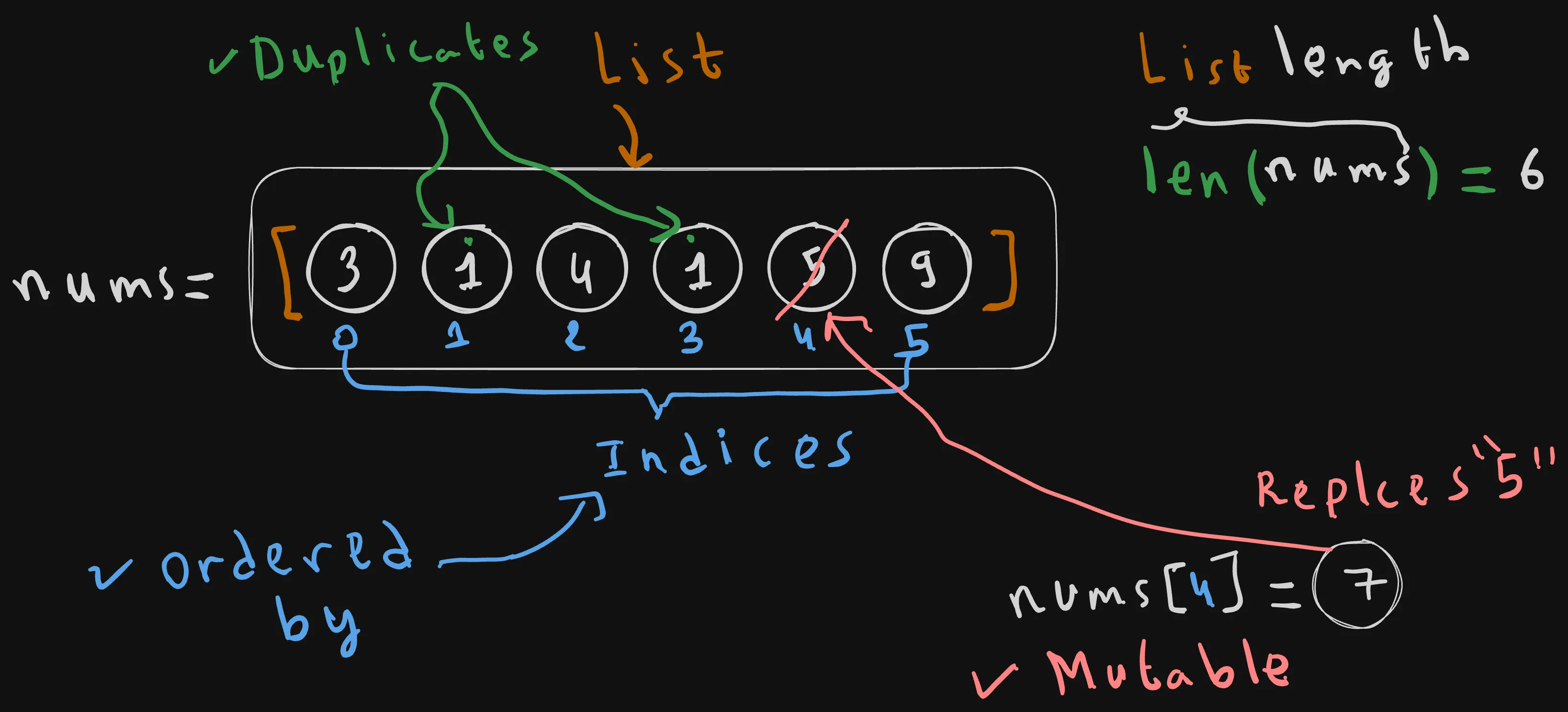
A list is a Python data structure that is used to store a collection of items (e.g. numbers: 3, 1, 4…) in a single variable (e.g. nums).
nums = [3, 1, 4, 1, 5, 9]
Lists in Python have the following characteristics: Lists Maintain items Order: as you can see from the image above, the items of a list are ordered by indices starting from 0.
In our nums example, 3 is at index 0, 1 is at index 1, 4 is at index 2, and so on until the last item of a value of9 at index 5.
You can get the length of a list using the len builtin.
In our case, nums has 6 items.
Notice that because of the fact that Python is a zero-based indexing language, the last index is 5, which is the length of the list minus one last_item_idx = len(nums) - 1 = 5.
Lists are Mutable: You can mutate a list, or in other words add, update, or remove elements, without generating a brand-new copy of the list in memory. For example, we can replace the item of value 5, located at the 4th index by 7, and then update will happen in-plance on the nums list, without having to create a brand new copy of it.
nums = [3, 1, 4, 1, 5, 9]

nums[4] = 7
nums[index]= new_item This syntax means that we are replacing the item at index 4 (5), with a 7.
Lists Allow Duplicates: Lists allow duplicates or identical items, for example in the nums list we can clearly see that 1 is a duplicated value, the first occurence of it is at index 1, and the second one is at index 3.
1. Inspecting & Reading Your List (The Fundamentals)
Length of a list
As we saw previously, checking the length of a list is a mater of using a simple builtin function len, which takes the list e.g num as an input, and returns its corresponding length as an output 6.
nums = [3, 1, 4, 1, 5, 9]
print(len(nums)) # 6
The len built-in has an instantaneous lookup time O(1).
In other words, it doesn’t have to iterate through the list everytime you call len.
But it just reads the list’s stored metadata, which include a capacity counter that gets updated automatically everytime the list gets mutated.
Checking Membership (1 in nums)
The easiest way to check whether an item is in the list is using the in membership operator, it’s syntax is straight forward, and reads natural, we check wether a given item is in the list.
For example, here we are checking whether 1 is in the list nums.
nums = [3, 1, 4, 1, 5, 9]
print(1 in nums)
The in operator performs a linear search lookup, which means that it traverses the whole list starting from index 0, until it finds a logical match of the item. If found, it stops at the first occurence and then returns True, if not it has to traverse the whole list and then return False.
in should be used sparingly, as it can get slow when the list is a large one, as it has a time complexity of O(N), which means that in the worst case the program can go through all the items N of the list.
You can image how slow it can gets if N is 1 million or 10 millions.
N = len(nums) = number of items in the list
Count occurrences
nums = [3, 1, 4, 1, 5, 9]
print(nums.count(1)) # 2
Let’s say that you’re interested in counting occurences of a specific element, say 1.
from the nums, array you can see that 1 has exactly two occurences, one at index 1, and the other at index 3.
Python’s lists, provide a built-in method to count occurences. Just write your list name (nums), dot count, and then pass the element or the value that you want to count.
For example, let’s pass a value of 1 to the count method.
Printing the result of nums.count(1), gives us a value of 2, as you can see from the example above.
The way it works, is that it cans the whole numbers array, starting from the first index to the last one, while incrementing an inner counter everytime an item equals 1 or any other element that we want to search for.
Indexing
As we saw before, lists are ordered by indexes, that start from 0 to the length of the list minus one.
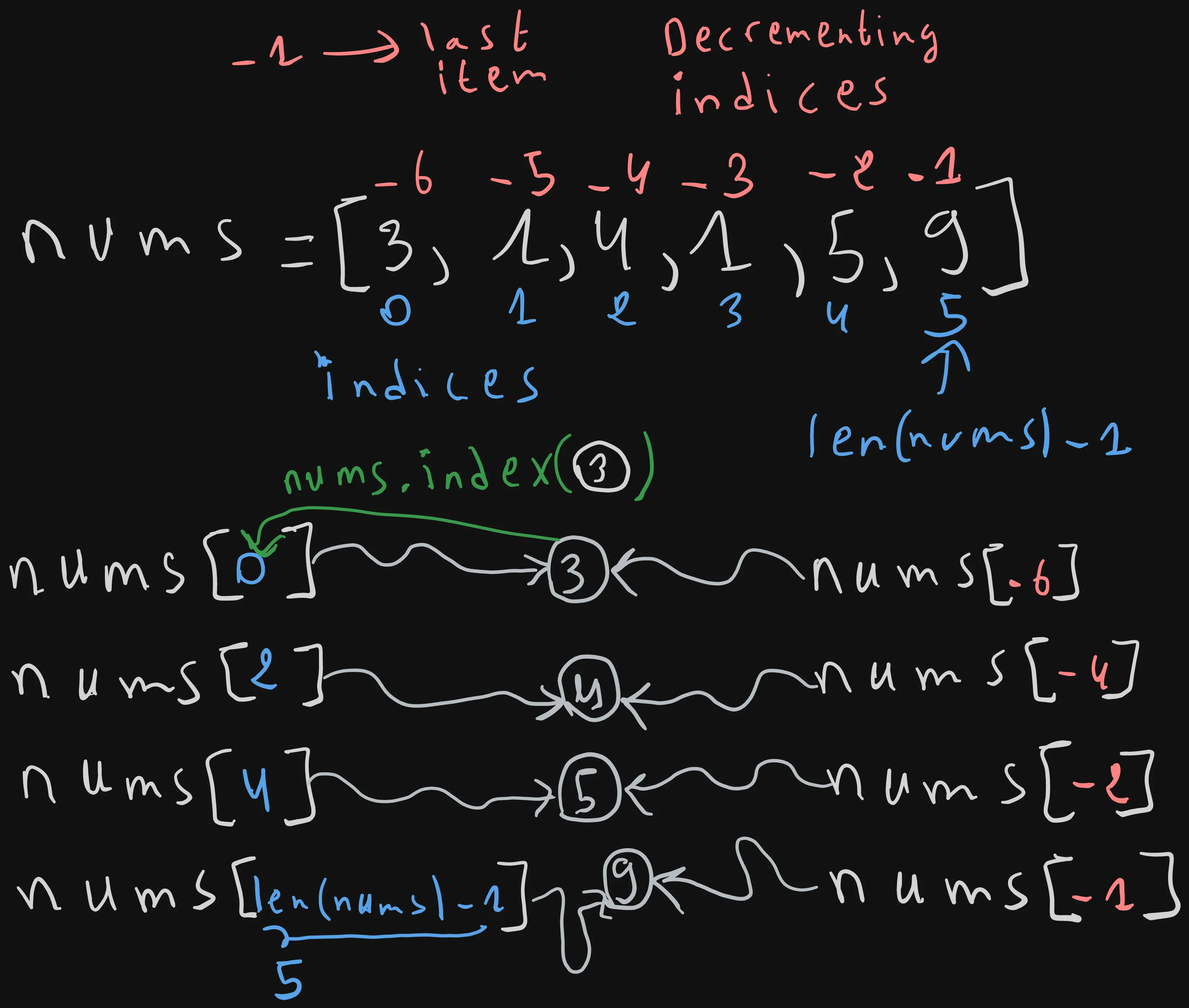
To retreive or lookup for a given element, say 3, we just have to write the list name, followed by its index 0, wrapped in square braces.
We can do the same for other items, such as item 4, located at index 2, item 5 located at index 4, and finally item 9 locating at the end of the list, or index len(nums) -1, which is equal to index number 5.
nums = [3, 1, 4, 1, 5, 9]

print(nums[0]) # 3
print(nums[2]) # 4
print(nums[4]) # 5
print(nums[len(nums)-1]) # 9
Python, provides a way to access items starting from the end of the list to its beggining using negative indices.
For example, index -1 correspond to the last element 9.
-2 correspond to the element before the last one 5.
-4 correspond to element 4 in the nums list, and so on, until we reach the first element at index 0, or negative index -len(nums), which is -6
print(nums[-1]) # 9
print(nums[-2]) # 5
print(nums[-4]) # 4
print(nums[-6]) # 3 = nums[ -len(nums)]
Indexing is instantaneous (O(1)) because the index acts as a lookup address. Or in other words, Python doesn’t have to go through all the items to find your element as it already knows where it is, thanks to the index-element stored mappings.
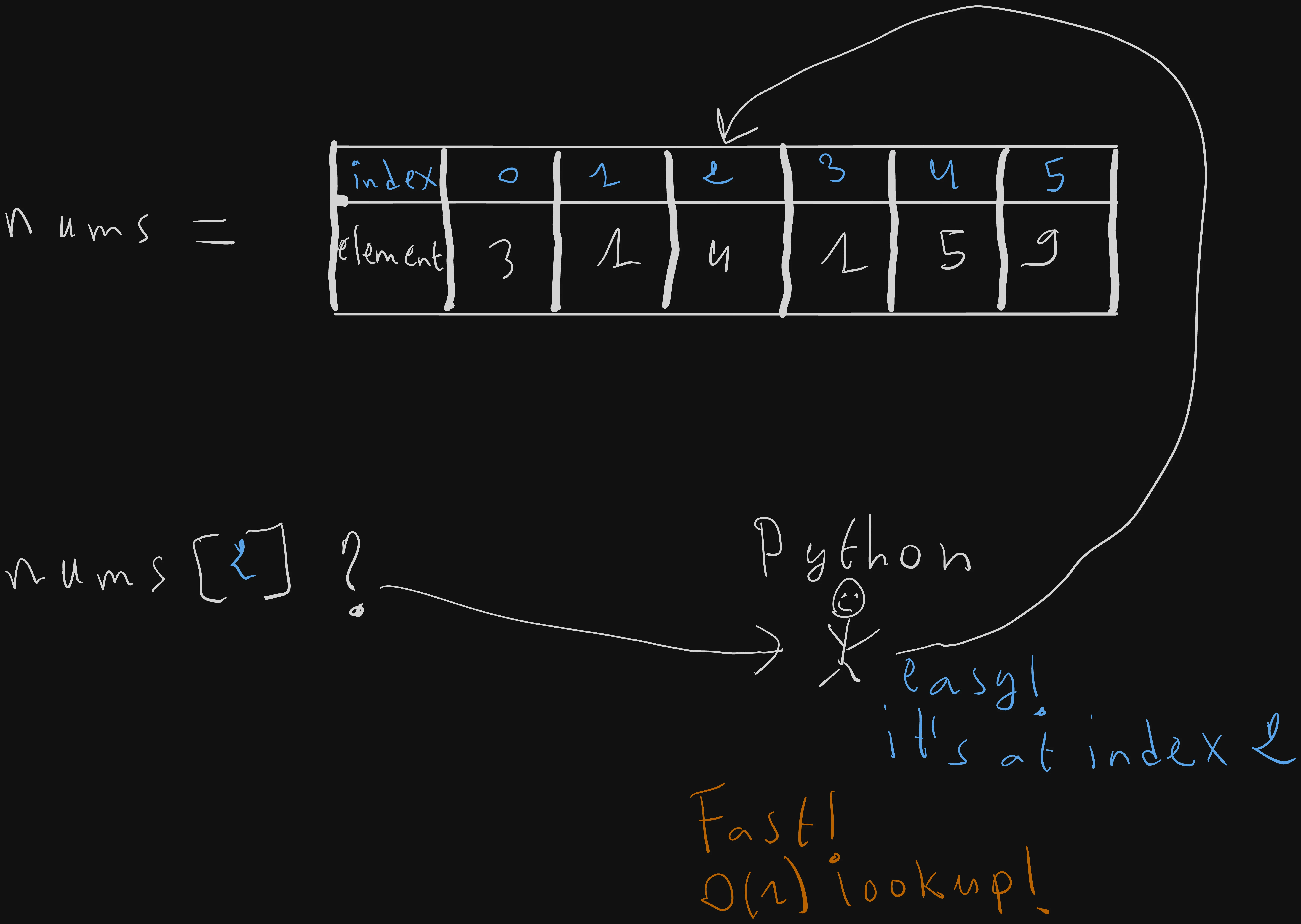
So we saw how to go from indices to elements, what about the contrary case, let’s say that we want to search for the index of the first occurence of element 3.
We can do that using the lists’ index method, just pass the element as an argument and it will return the index of the first occurence.
nums = [3, 1, 4, 1, 5, 9]
nums.index(3) # 0
nums.index has to searches through the list from left to right to find the first occurence of the value that we are searching for.
So the lookup time, sacles relative to the length of the list N=len(nums (O(N)).
The reason behind that is the that lists are designed to map indices to elements and not the other way around. That’s why Python, in the worst case e.g nums.index(9), has to go through the whole list just to find where element 9 is located, and then return its corresponding index.
2. Modifying Elements (Basic CRUD Operations)
Append (Create)
We often need to push an element at the end of a list.
For example if your list stores “order ids”, and a new order comes in you may want to add it to the list, to queue it for later processing.
To add an element e.g x=2 at the end of a list, we can use the list_name.append method.
The append method takes the element that we want to push as a param.
For example, here we are adding the element x=2 to the end of the nums array.
nums = [3, 1, 4, 1, 5, 9]
x = 2

nums.append(x)
print(nums) # [3, 1, 4, 1, 5, 9, 2]
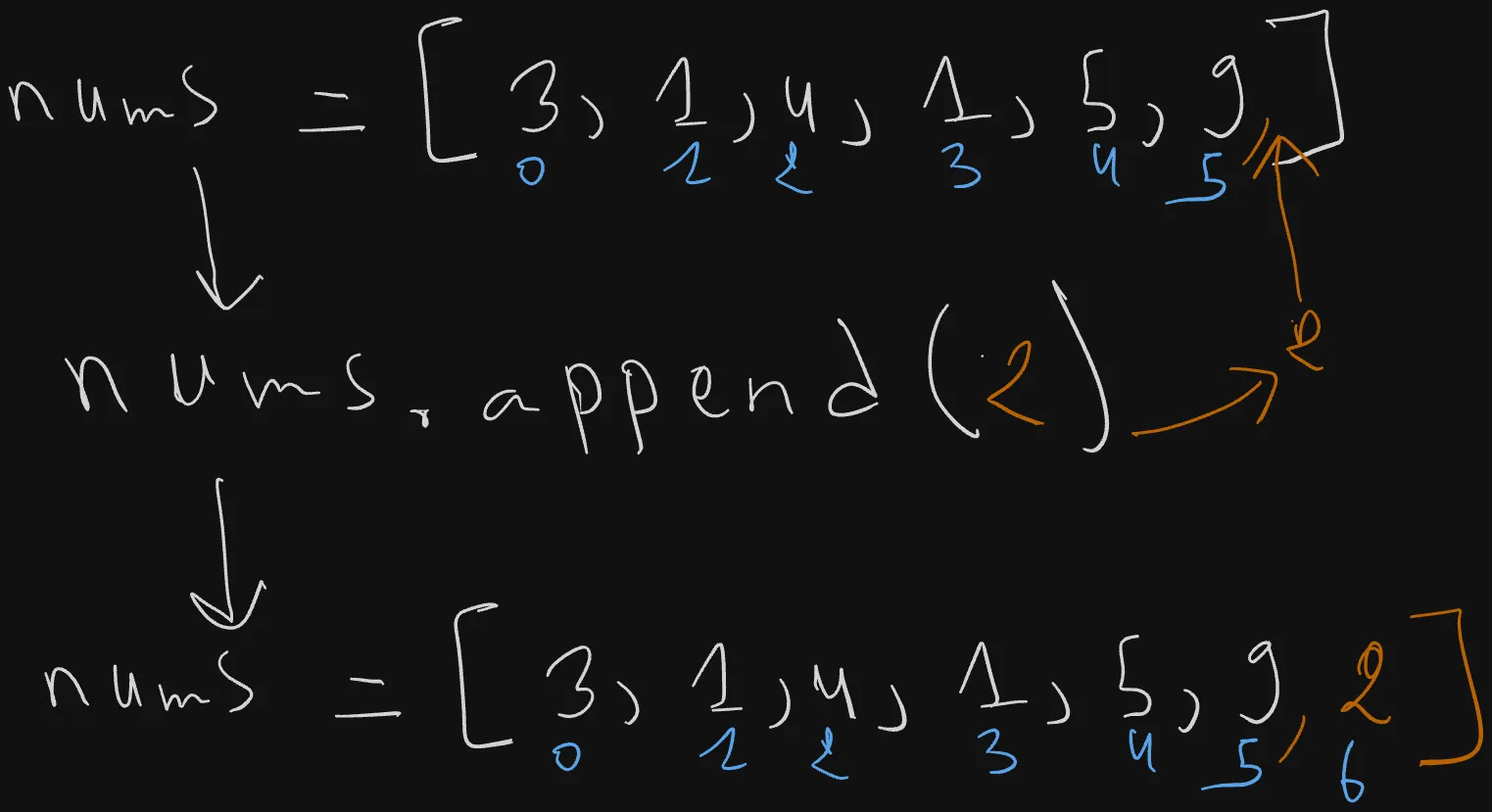
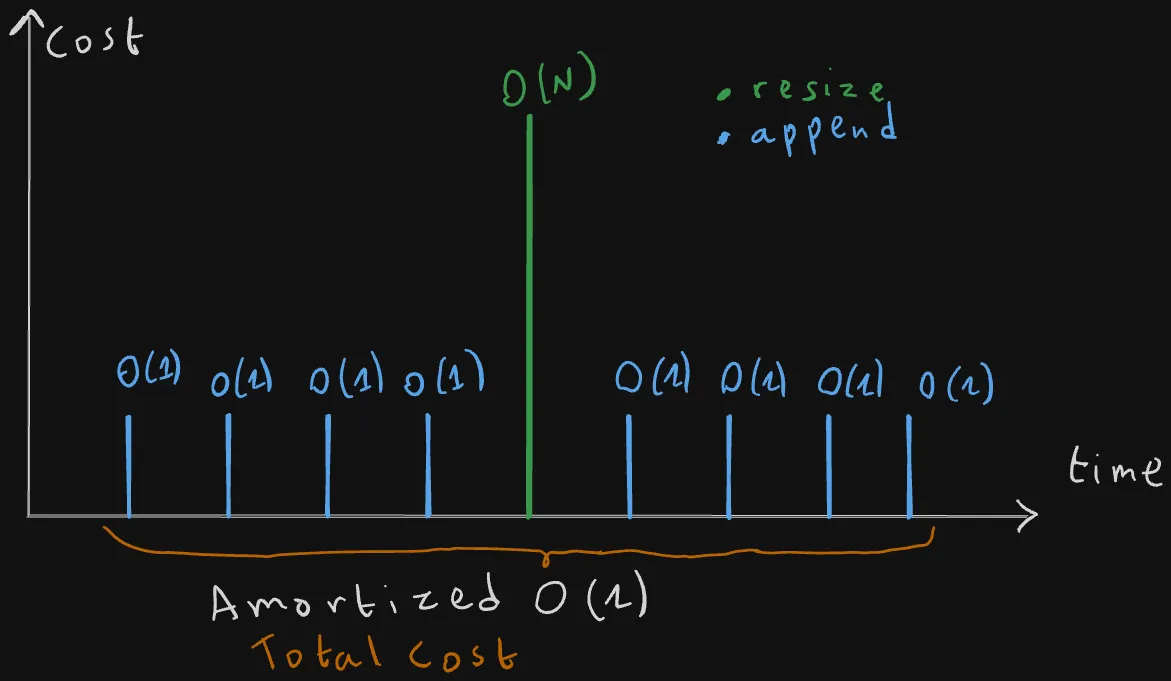
Appending an element to a list happens most of the times instantaneously(O(1) amortized or averages).
The only moment when this operation can be slow is when the list exceeds the intial memory space allocated to it, when that happens Python has to resize the list, by copying all the N elements to the new allocated memory location (O(N)).
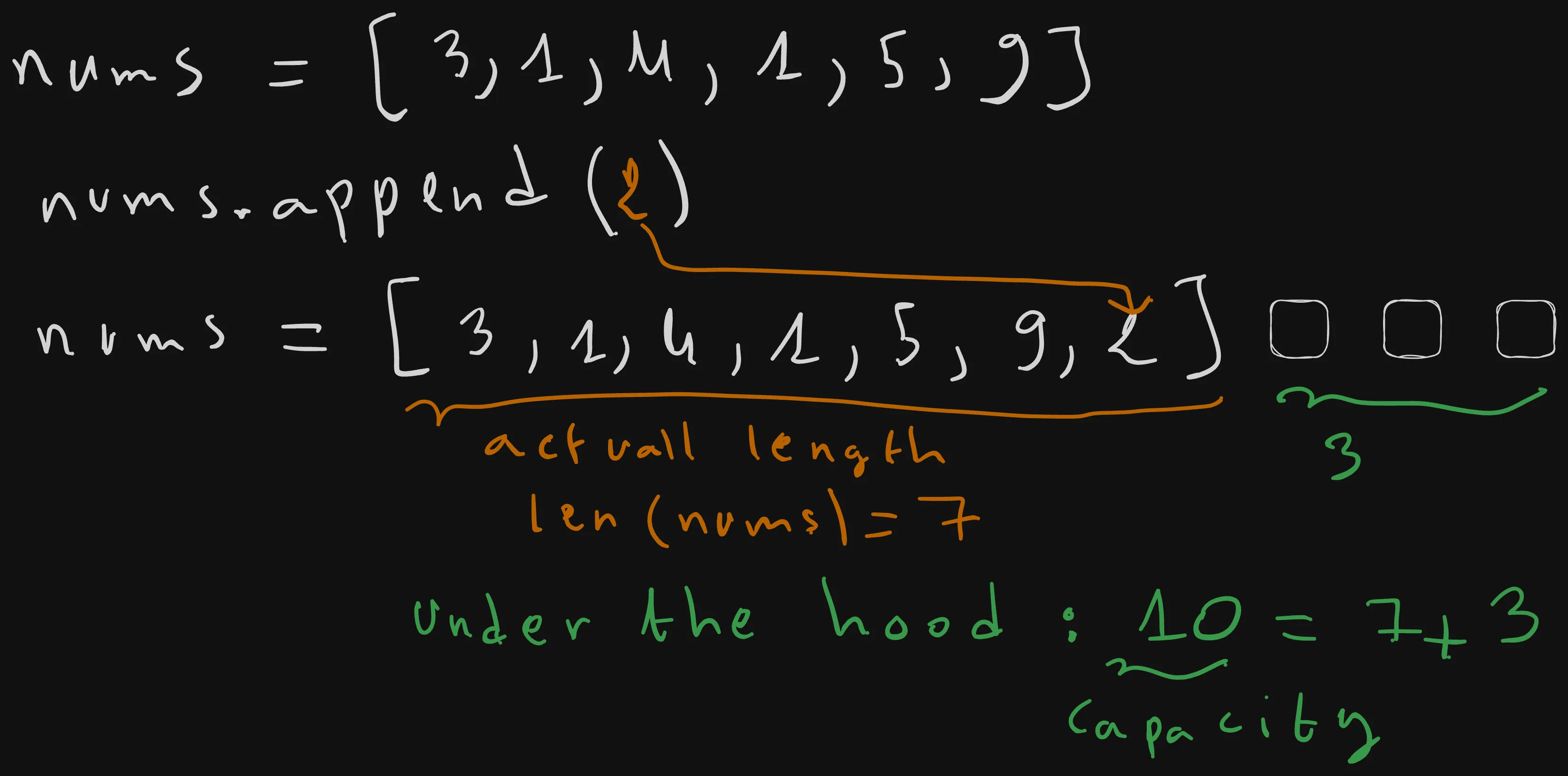
But this happens rarely, so over a large number of operations the time complexity is average at “amortized O(1)”.
Extend list (Create)
nums = [3, 1, 4, 1, 5, 9]
nums.extend([10,11])
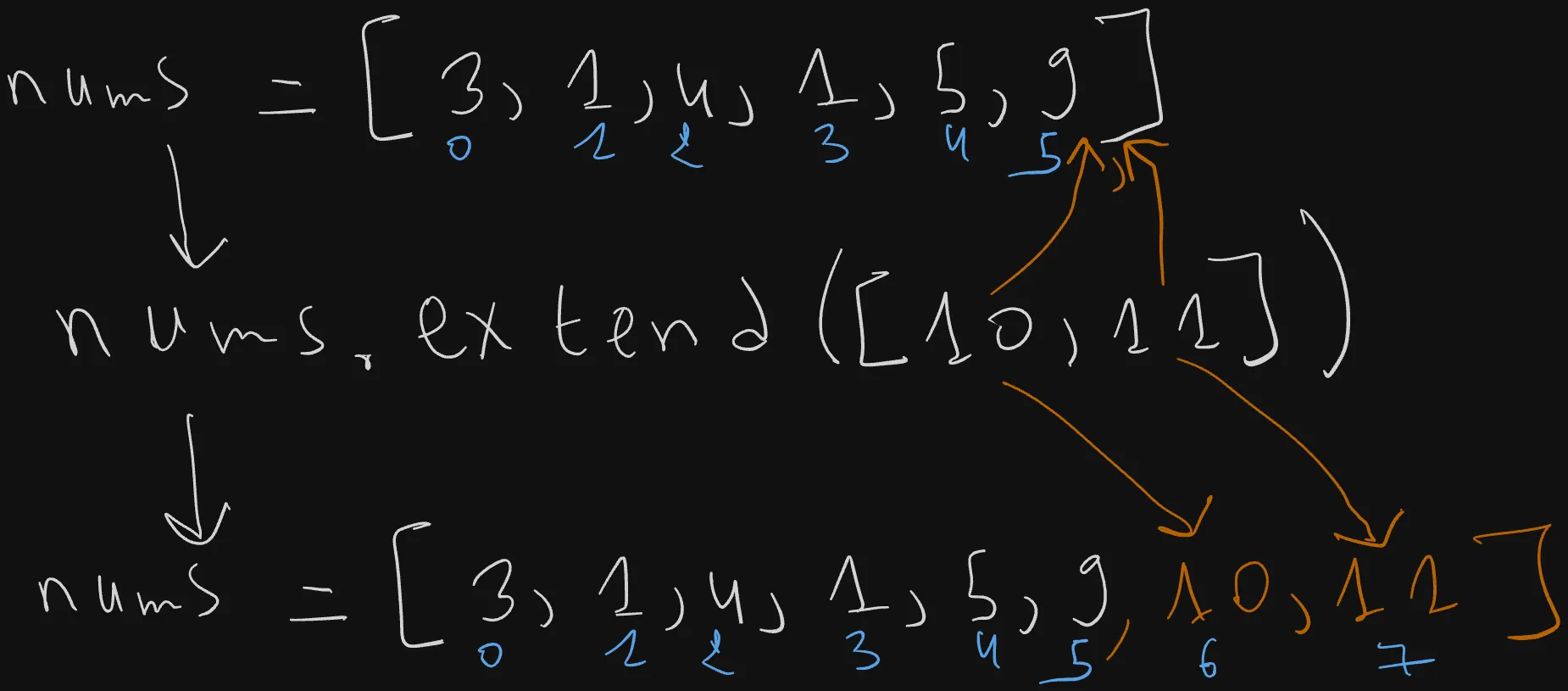
Extend works similarly as append, but instead of taking a single element as a parameter, it takes another list eg. [10,11], and appends each of its individual elements sequentially to the end of the original list.
Insert element x at index i (Create)
 The
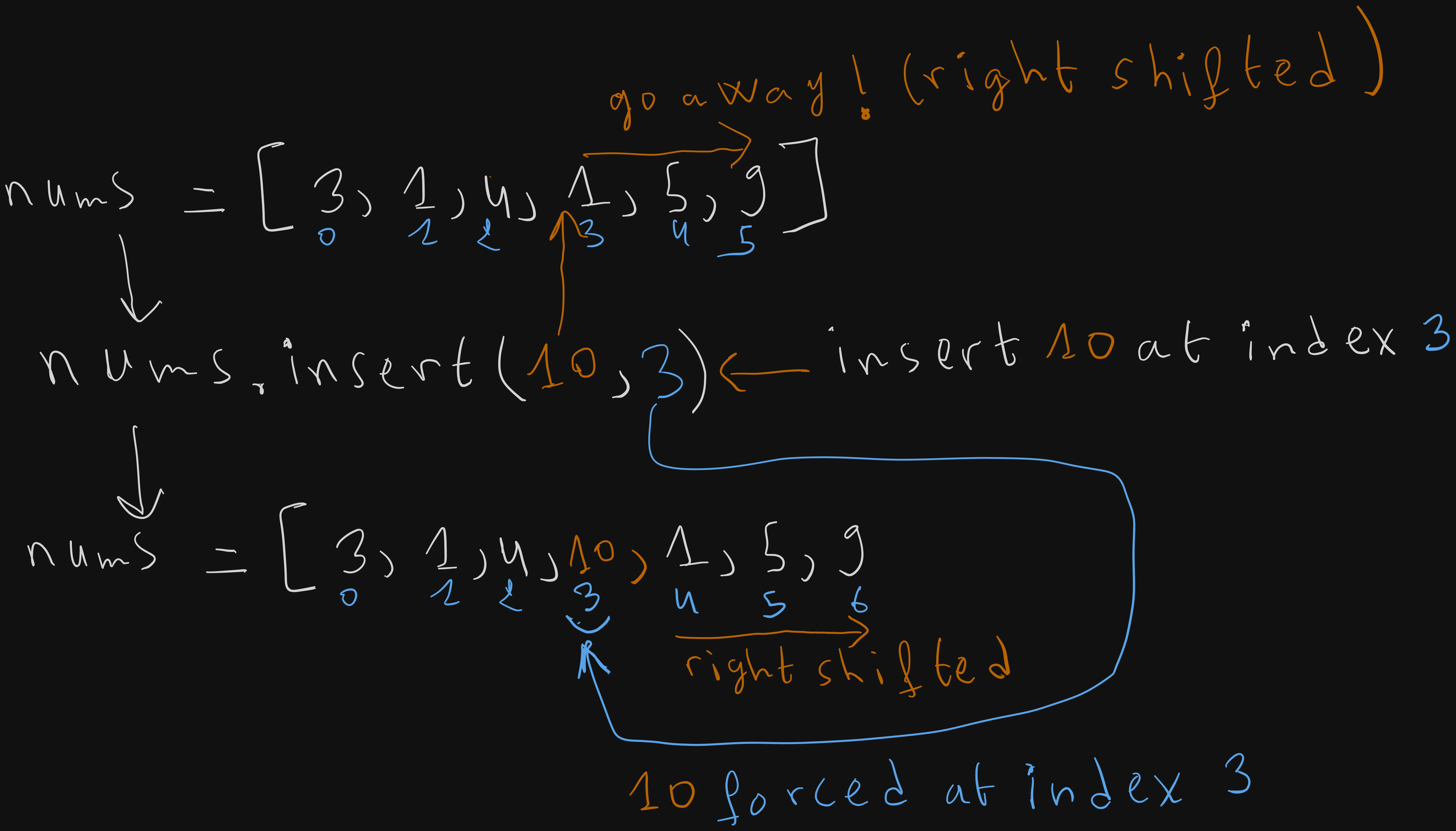
The list_name.insert(index,element) method allow us to insert a new element, say 10, at a specific index, say 3. The way it works is by placing the element 10, at index 3, and then right shifting all the other elements that comes after it by one position towards the right.
As described in the above figure, element 1 shifts towards the right by one position, from index 3 to 4.
5 goes from index 4 to 5.
Element 9 moves from position 5 to 6.
nums = [3, 1, 4, 1, 5, 9]

x = 10
i = 3
nums.insert(i,x)
print(nums) # [3, 1, 4, 10, 1, 5, 9]
Updating values by index (Update)
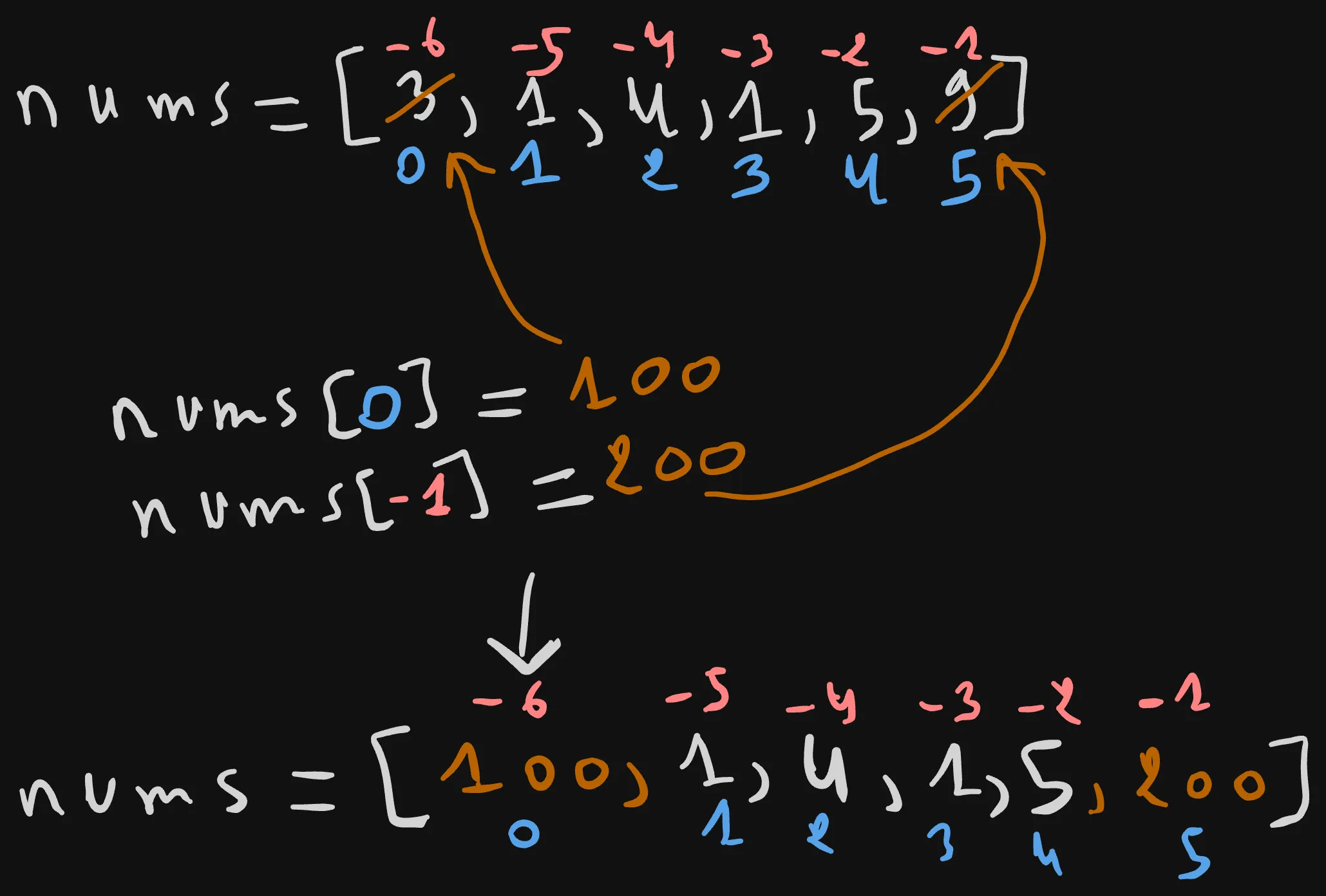
Now that we covered the Create operations, let’s now tackle the update!
Updating an element is a matter of using the previously discussed indexing sytax along with the assignment operator =:
For example, to update the element at index 0, and override it to a value of 100.
We simply write the list name nums, followed by the 0 index wrapped in square braces, then using the assignment operator =, we assigned a value of 100 to it.
nums = [3, 1, 4, 1, 5, 9]
nums[0] = 100
print(nums) # [100, 1, 4, 1, 5, 9]
Similarly, let’s assigned a value of 200 to the last element of the nums array, and replace the current value 9 with a value of 200.
We can either specify the exact index of the last element len(nums) -1, or preferably use negative indexing which is equivalent.
The last index corresponds to a value of -1.
nums = [3, 1, 4, 1, 5, 9]
nums[0] = 100
nums[-1] = 200
print(nums) # [100, 1, 4, 1, 5, 200]
Remove the first occurrence of x (Delete)
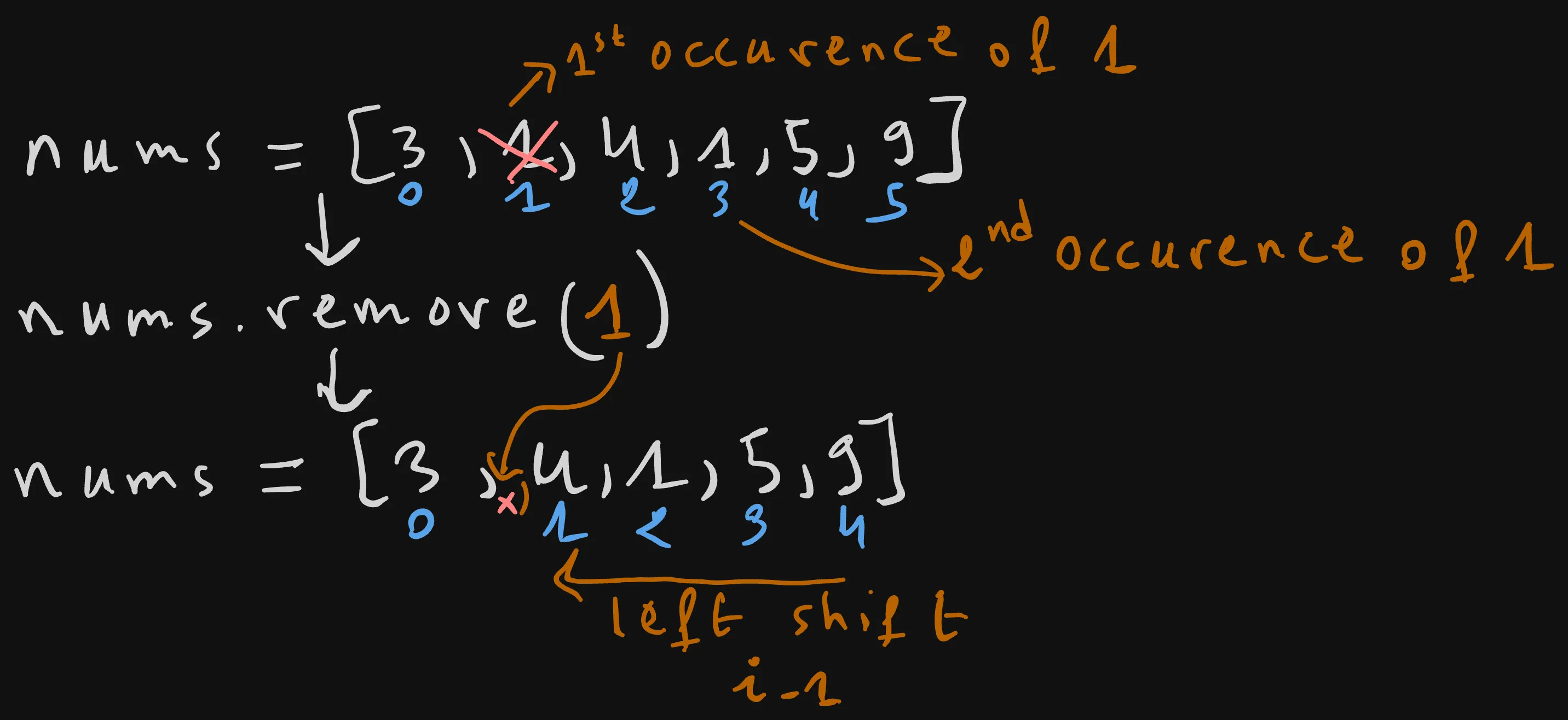
There are various ways to delete items in a list, one of them is using the list_name.remove(element) method.
We need to simply specify the element that we want to remove, say element 1, and then the remove method will iterate through the list from left to write, locate the first occurence of the element and then deltes it.
For example, the first occurence of 1 is at index 1, so the remove method simply located, drop it while shifting the position of the elements that come after towards the left, as shown in the above figure.
nums = [3, 1, 4, 1, 5, 9]

nums.remove(1)
print(nums) # [3, 4, 1, 5, 9]
Remove & Return the last element (Delete)
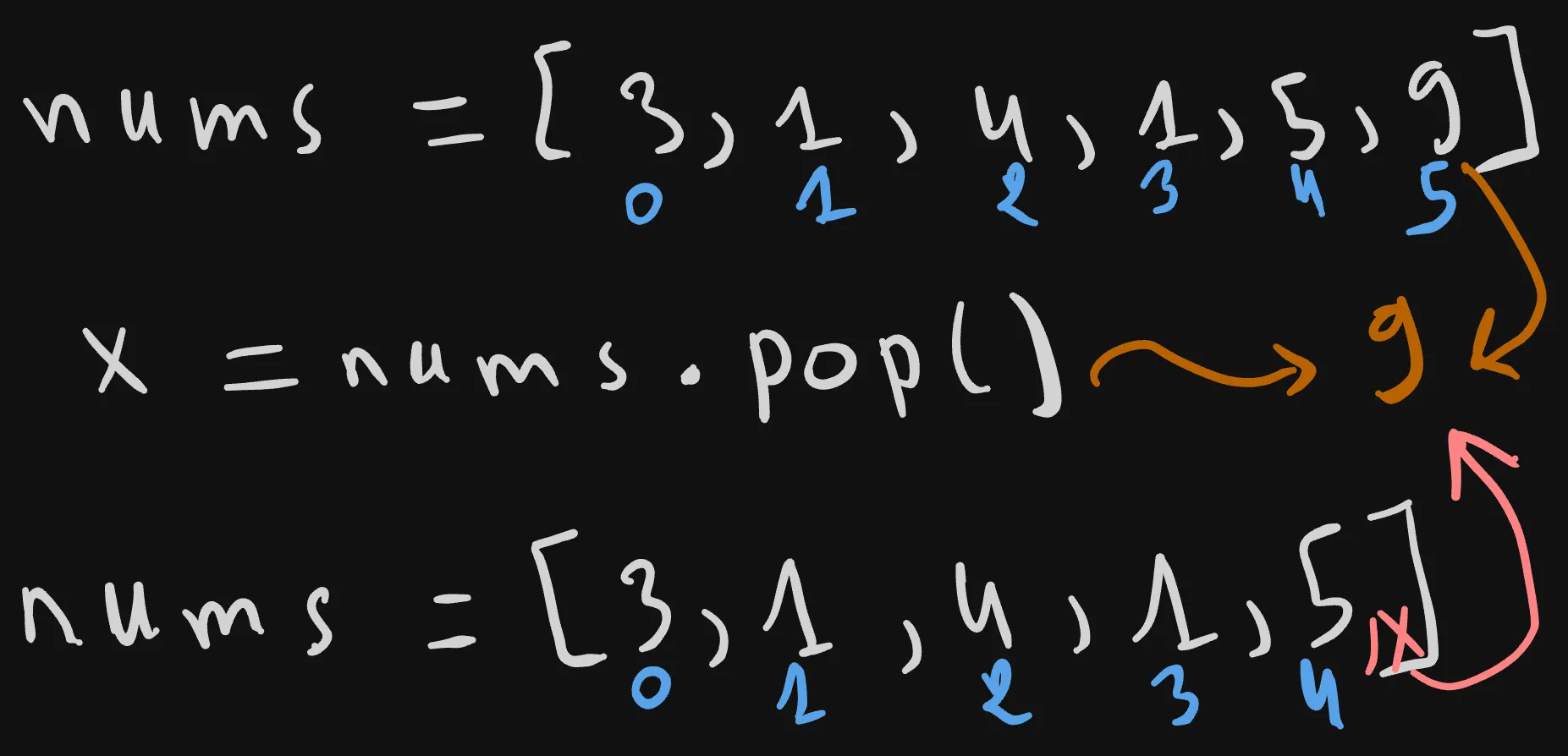
Another way to delete an element is using the list_name.pop() method, which by default removes the last element, and then returns it.
nums = [3, 1, 4, 1, 5, 9]

x = nums.pop()
print(x) # 9
print(nums) # [3, 1, 4, 1, 5]
To confirm that, in the above example code, we used the pop method, which removes the last element 9 while returning it. We stored the returned value in an x variable, after that we’ve printed it along with the modified nums array.
As you can see from the output, the last element 9 got removed, and the value of x is indeed the returned value of the pop method.
Remove & Return elements by index (Delete)
list_name.pop(index= -1)
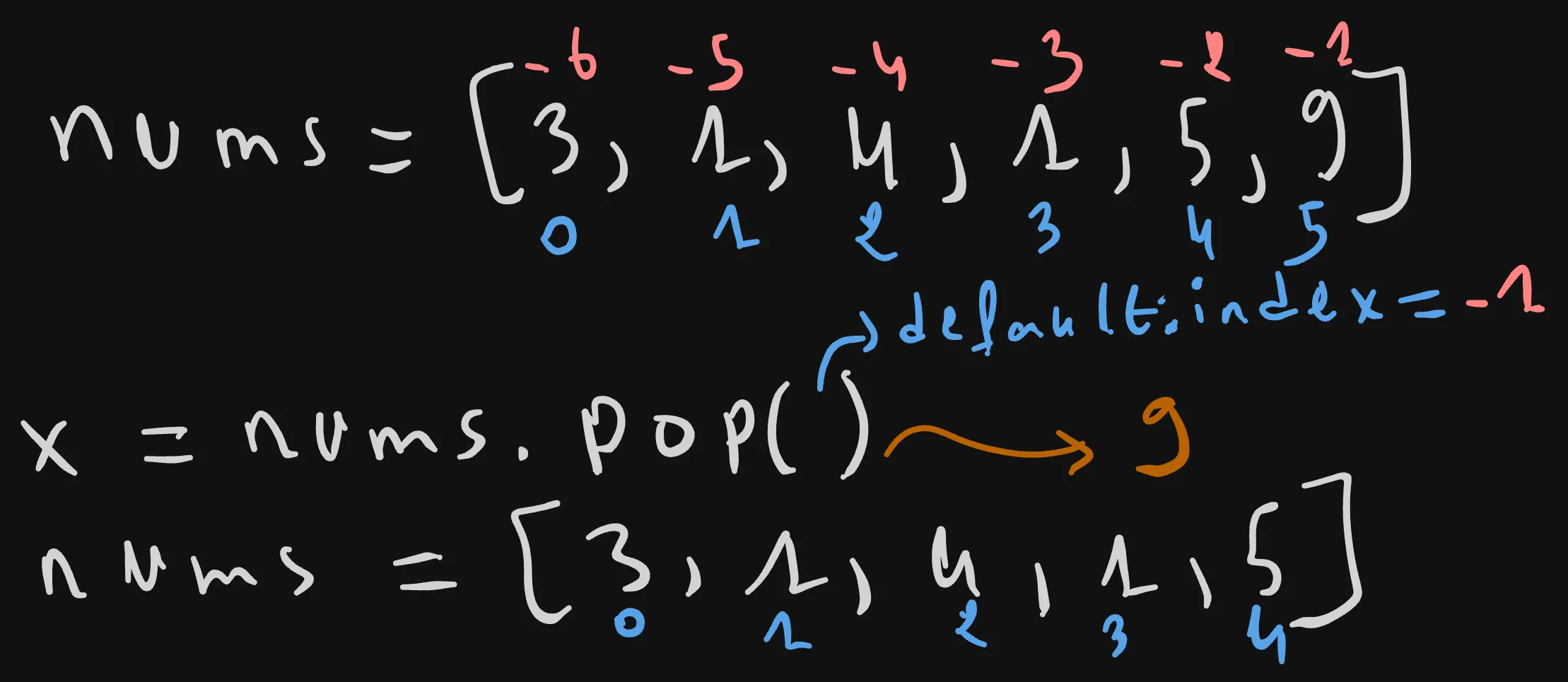
The previous example is quite equivalent to this one below.
x = nums.pop(-1)
print(x) # 9
print(nums) # [3, 1, 4, 1, 5]
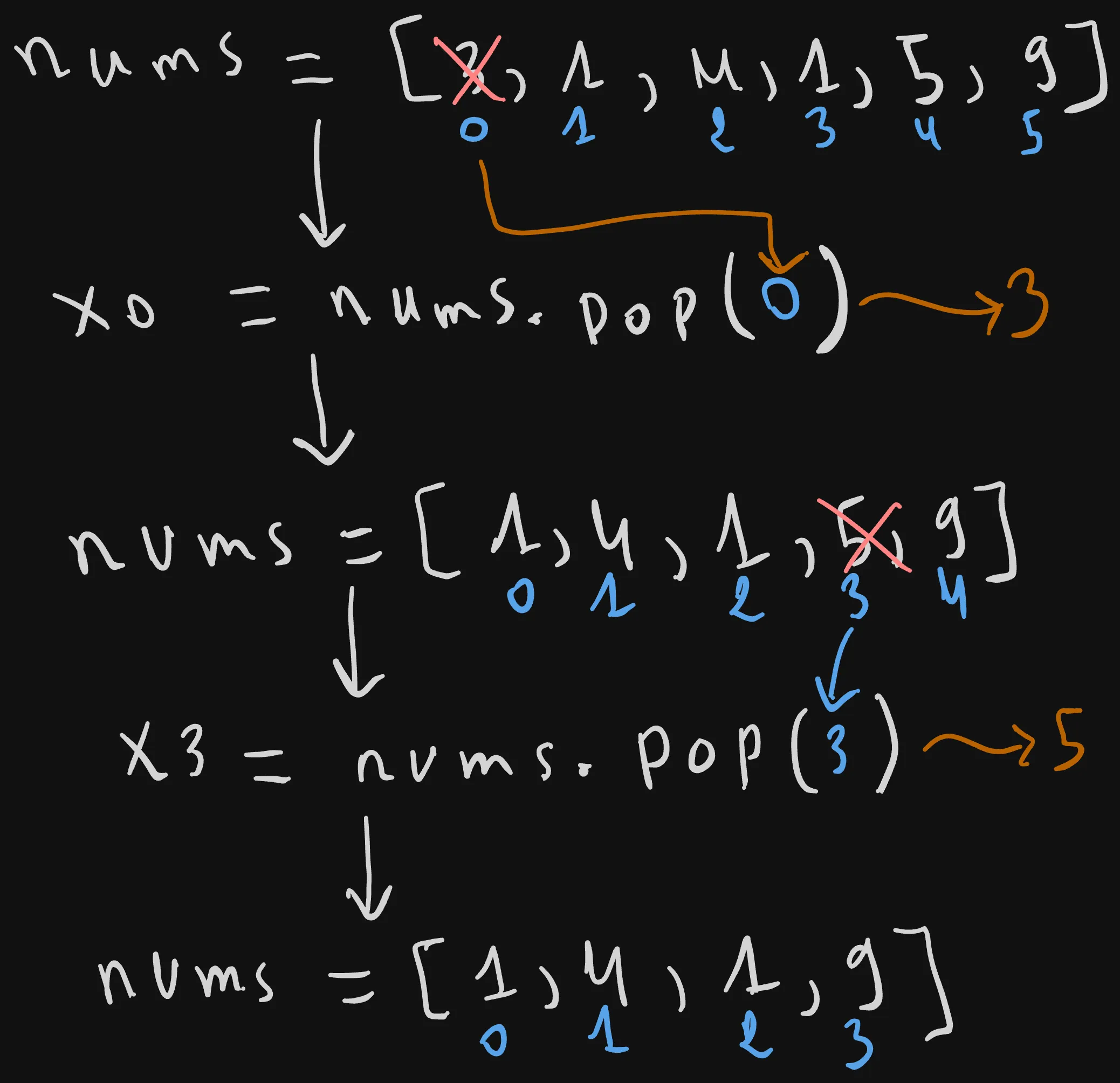
Because actually, pop accepts an index param, which is the index of the element that we want to “pop” or remove and return. When not passed it defaults to -1, which corresponds with the index of last element.
So if we wanted to pop the element at a different index, say the first one, we can just pass an index of 0 as you can see below.
The first element 3 gets poped into an x0 variable, and the array nums shrinks in size because the first element 3 got removed.
To further demonstrate this, let’s pop an element at a different index, say element 5 located at index 3 into a variable x3.
So after these two operations, the final list contains only 4 elements 1, 4, 1, and 9, while the two elements 3 and 5 got respectively poped into the two variables x0, and x3.
nums = [3, 1, 4, 1, 5, 9]

x0 = nums.pop(0)
print(x0) # 3
print(nums) # [1, 4, 1, 5, 9]
x3 = nums.pop(3)
print(x3) # 5
print(nums) # [1, 4, 1, 9]
Delete an item (Delete)
nums = [3, 1, 4, 1, 5, 9]
del nums[0]
print(nums) #[1, 4, 1, 5, 9]
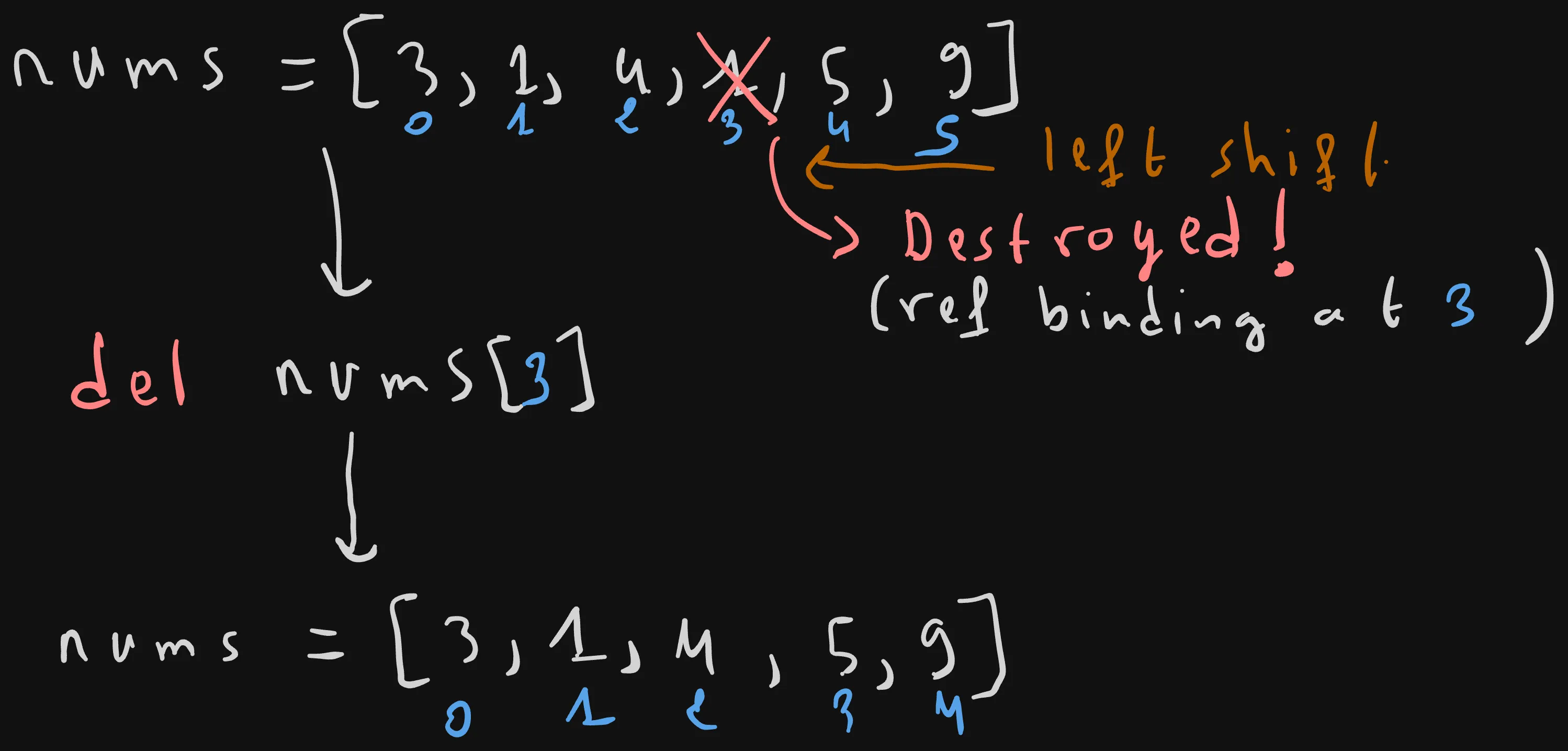
Finally, i’d like to mention another way to delete a give element in a list given its index, which is using the del keyword.
The del keyword is in fact a low-level keyword statement that totally destroys the reference binding at index 0 in memory.
It works exactly as list_name.pop(index) method, but it does not return the deleted element.
3. Advanced Slicing (Extracting Windows of Data)
Now that we’ve gone through all the CRUD operations that you can perform on a list, let’s move into one advanced, but highly used concept called slicing.
Slicing is used to extract a portion of a list without modifying the original one.
In other words, it is used to extract a sublist from a given parent list.
For example, let’s say that we want to extract a sublist, or a slice from the nums list, starting from index 1 up to index 4.
We can do that using a similar syntax to the indexing one, you start with the parent list name, then within the square brackets you write the start index, colon :, the stop one.(sub_list = parent_list[start: stop])
In our case, we want to extract from the parent list nums, a slice starting from index 1 to index 4.
nums = [3, 1, 4, 1, 5, 9]
print(nums[1:4]) #  [1, 4, 1]
The stop index is exclusive which means that the element at that index(stop=3) won’t get included in the extracted slice.
So only elements 1, 4, and 1 at indices 1, 2, and 3 respectively will get included.
That’s why it’s called the
stopindex and not theendone, because at it, we stop slicing or adding new elements to the sub lists.
Slicing with Omitted Start
When the start parameter is left empty, python automatically defaults it to 0.
Note that you need to include the colon
:, because it’s the thing that distinguitishes the slicing syntax from the indexing one.
So the expression nums[0:4], behaves exactly as nums[:4].
nums = [3, 1, 4, 1, 5, 9]
print(nums[0:4]) #  [3,1, 4, 1]
print(nums[:4]) #  [3,1, 4, 1]
Slicing with Omitted Stop
Similarly as we did with start, it’s also possible to leave the stop parameter empty, this will signal to Python to capture all the remaining elements of the parent list into the slice, starting from the start index to the end of it.
For example, omitting the start indexing in the expression nums[1:], will result in returning a slice starting from index 1 until the end of the list.
This expression is equivalent to nums[1:6], as the last index of the list is 5, and the stop index is exclusive.
nums = [3, 1, 4, 1, 5, 9]
print(nums[1:]) # [1, 4, 1, 5, 9]
print(nums[1:6]) # [3,1, 4, 1]
Negative Slicing Boundaries
It’s also possible to use negative indexing.
For example we can set the start index, to -2, which correspond to the index 4, which is the index of the before last element 5.
nums = [3, 1, 4, 1, 5, 9]
print(nums[-2:]) # [5, 9]
Slicing the Absolute Last Item
You can get the last element by slicing from the last element index -1.
Sometimes it may be handy to slice only the last element. To do that we just need to use -1 as the start slicing index, and leave the stop one empty after the colon :.
nums = [3, 1, 4, 1, 5, 9]
print(nums[-1:]) # [ 9]
Leaving Both Start and Stop Empty
We saw that it’s possible to leave either the start, and stop indices empty, but what happen when you leave both of them like that?
Well, when there is no boundary from both the start and the stop, the whole list
nums = [3, 1, 4, 1, 5, 9]
print(nums[::]) # [3, 1, 4, 1, 5, 9]
Negative Step Slicing (Reversing)
When using the slicing expression there is an extra colon parameter that we didn’t mention yet.
It’s the step parameter, this latter represents the number of steps we are taking when iterating through the parent list from left to write to collect its items.
list_name[start:stop:step]
When not specified, Python defaults it to step=1, which explains the default behavior when not mentioning it in the slicing expression.
For example, let’s leave both the start and stop indices empty to slice the whole list, and use a negative step=-1 instead.
This means that the first iteration will start at the last element 9, then keep collecting items from right to left until start=0.
nums = [3, 1, 4, 1, 5, 9]
print(nums[::-1]) # [9, 5, 1, 4, 1, 3]
Slice Assignment
nums = [3, 1, 4, 1, 5, 9]
nums[1:3] = [10,11]

print(nums) # [3, 10, 11, 1, 5, 9]
Explanation: Slice assignment targets an inner contiguous segment range window (index 1 and 2) and replaces those specific values with the values unpackable from the assigned list sequence directly in place.
Evaluating Shallow Copy Independence
When extracting a new slice, say new_nums from a parent list nums.
The new produced slice is a fresh and new shallow copy of the original list, stored in a different place in memory.
For example, if we append a new value, say 10 to the new list new_nums, the original one nums will remain unchanged.
nums = [3, 1, 4, 1, 5, 9]
new_nums = nums[1:3]

print(new_nums) #  [1, 4]

new_nums.append(10)

print(new_nums) # [1,4,10]
print(nums) #[3, 1, 4, 1, 5, 9] unchanged
Okay, now let’s say that our list nums is a nested list, where each sub list contain only one item, which corresponds to the items that we had previously.
What will happen if we get a new slice nums, and then append an item, say 10 in one of its sub lists.
nums = [[3], [1], [4], [1], [5], [9]]
new_nums = nums[1:3]

print(new_nums) #  [[1], [4]]

new_nums[0].append(10)

print(new_nums) # [[1, 10], [4]]
print(nums) # [[3], [1, 10], [4], [1], [5], [9]]
Well, as we said previously that the slice syntax produces a shallow copy, which means that it just copies the top level elements of the list.
For int values that doesn’t matter because they are basic values.
But for a another data structure or complex object, only the reference of this latter gets copied.
In other terms the sub lists inside new_nums are just references or pointers to the parent list nums sub lists.
That’s why appending a value of 10 to the first sub-list of the new_nums list result in changing the corresponding one in the nums parent list.
4. Iteration & Basic List Analytics
Loop through a list
As for-loops can be used with any iterator including lists.
You can easily iterate over a list using the for item in list_name: syntax.
nums = [3, 1, 4, 1, 5, 9]
for num in nums:
    print(num)
Output:
3
1
4
1
5
9
This syntax is equivalent to the one below, where we manually manage the index.
nums = [3, 1, 4, 1, 5, 9]
for index in range(len(nums)):
    num = nums[index]
    print(nums[index])
The previous syntax is more used as it’s more handy, because most of the time we only care about iterating over all the elements of a list.
In case we wanted a custom number of iterations, we can always use the range(len(list_name)) approach.
The only issue with the simplified syntax is that by default you don’t have access to the index which you may need some times.
Fortunately, Python provides a built-in global for that: enumerate(list_name).
By wrapping your list in enumerate, you gain the ability to access an index at each iteration in addition to the current element num.
nums = [3, 1, 4, 1, 5, 9]
for index, num in enumerate(nums):
    print(index, num)
Output:
0 3
1 1
2 4
3 1
4 5
5 9
sum, min and max
As it’s often to need to calculate the sum, min element or max element. Python provide built-in numerical global functions for that.
sum takes a list as an input, and returns the sum of all of its individual items.
min returns the smallest element of the list.
max returns the largest element of the list.
Despite
nums = [3, 1, 4, 1, 5, 9]
print(sum(nums)) # 23
print(min(nums)) # 1
print(max(nums)) # 9
Min and Max index
In case you wanted to get the index of the min or max element instead of the value, you can use the list_name.index(element) built-in that we saw before, and then pass it the returned value of min(list_name) or max(list_name) to get the min or the max respectively.
nums = [3, 1, 4, 1, 5, 9]

min_idx = nums.index(min(nums))
print(min_idx)
max_idx = nums.index(max(nums))
print(max_idx)
5. Basic Reversing and Sorting
Reverse a list
We saw previously that you can reverse a list using the nums[::-1] slice expression syntax, which returns a shallow copy of the list reversed.
But actually a more readable way exist, which is using the list_name.reverse() method.
nums = [3, 1, 4, 1, 5, 9]

nums.reverse()

print(nums)# [9, 5, 1, 4, 1, 3]
This latter does an in-place reverse, which means that it modifies the original list nums.
If you prefer rather doing it in an Immutable way, meaning that a brand new list gets created and returned use the reversed global function
In contrast with the list_name.reverse method, reversed(list_name) works in a lazy manner, if your try to print it right way, it will returns a reversed iterator object.
You need to explicitly tell Python, that i want the list now, and not lazily loaded by casting the return object into a list list(reversed(list_name)).
nums = [3, 1, 4, 1, 5, 9]
nums_reversed = reversed(nums)
print(nums) #[3, 1, 4, 1, 5, 9]
print(nums_reversed)# <list_reverseiterator object at 0x107adb1f0>
print(list(nums_reversed))# [9, 5, 1, 4, 1, 3]
Sort
Similarly if you wanted to sort a list in an ascending order, Python provides two ways of doing so: The in-palce way where the original list gets modified. And the immutable way where a brand new sorted list gets returned
list_name.sort() simply sorts the list in an ascending order while modifying the original list.
nums = [3, 1, 4, 1, 5, 9]
nums.sort()
print(nums)# [1, 1, 3, 4, 5, 9]
sorted(list_name) built-in global does not touch the original list, but it returned a new list sorted_nums sorted in ascending order.
Similarly to reversed, sorted is optimized to work lazily, so it returns an iterator object that needs to be casted to a list.
nums = [3, 1, 4, 1, 5, 9]
sorted_nums = list(sorted(nums))
print(nums)# unchanged: [1, 1, 3, 4, 5, 9]
print(sorted_nums) # sorted: [1, 1, 3, 4, 5, 9]
Sorting arguments (The reverse Flag)
Okay now what about sorting in a descending order?
Well, both list_name.sorted and sorted(list_name) accept a reverse argument which defaults to False by default.
Setting reverse=False (the default) means that the list will be sorted in an ascending order.
While explicitly setting it to True, imply that the list will get sorted in a descending order.
nums = [3, 1, 4, 1, 5, 9]
nums.sort(reverse = True)
sorted_nums = list(sorted(nums, reverse=True))
print(nums)# [9, 5, 4, 3, 1, 1]
print(sorted_nums) # [9, 5, 4, 3, 1, 1]
6. Advanced Custom Sorting (Using Keys & Lambdas)
in addition to the reverse parameter, another usefull parameter exists: the key parameter
The parameter key accepts a function, that takes an element as an input and returns the key as an output.
We will learn more about functions later in this tutorial.
All you need to know for now is that a function can be defined in python using the def keyword.
And that a function basically defines a transformation by taking an input x and mapping it into an output y. In our case, we want to map each array element into a sorting key.
Let’s say that we have the following list of numbers, and we want to sort it based on the number of digits of each number.
nums = [1000,1,30,400]
To do that we need a sorting key for each element. Let’s define a function that maps each list item to its corresponding sorting key, which is in this case the number of its digits:
nums = [1000,1,30,400]

def transform_element_to_key(element):
    key = len(str(element))
    return key

print(transform_element_to_key(nums[0])) # 4
We named the function with a straightforward descriptive name transform_element_to_key.
The function receives an element input parameter eg. element=1000, does some transformation, and then returns the corresponding key, which is 4 for the list element 1000.
We use a simple method to get the number of digits: we simply cast the number into a string str(element)=="1000", and then get the length of that string using the len builtin function.
After that we sort the array, using the list’s in-place sort method, with the parameter key equal to our previously defined key transformation function.
nums.sort(key = transform_element_to_key)
print(nums)# [1, 30, 400, 1000]
The result is the nums array sorted by the number of digits of each element:
1 --> 1 digit
30 --> 2 digits
400 --> 3 digits
1000 --> 4 digits
We can also make the previous example shorter using what’s called a lambda function, which is an inline, anonymous and shorter way of defining a function.
anonymous function: a function without a given name.
nums.sort(key = lambda element: len(str(element)))
print(nums)# [1, 30, 400, 1000]
We will learn more about functions and lambdas in future tutorials of the series!
Summary
List basics
nums = [3, 1, 4, 1, 5, 9]
- Ordered by zero-based indices.
- Mutable (changeable in place).
- Allow duplicate values.
- Length:
len(nums)→ last index islen(nums) - 1.
Length
len(nums) # 6- Instantaneous O(1) lookup from stored metadata.
Membership test
1 in nums # True- Linear search O(N); can be slow on large lists.
Count occurrences
nums.count(1) # 2- Scans the whole list and tallies matches.
Indexing
nums[0]          # 3
nums[len(nums)-1]# 9
nums[-1]         # 9 (last)
nums[-2] # 5- Positive or negative indices; O(1) access.
Find index of a value
nums.index(3) # 0- Returns the first occurrence; O(N) search.
Append (add at end)
nums.append(2)- Amortized O(1); occasional resize is O(N).
Extend (add multiple items)
nums.extend([10, 11])- Appends each element of the given iterable.
Insert at index
nums.insert(3, 10)- Places the value at the given index and shifts later elements right.
Update by index
nums[0] = 100
nums[-1] = 200- Direct assignment replaces the value at that index.
Remove first occurrence
nums.remove(1)- Deletes the first matching value and shifts later elements left.
Pop (remove and return)
x = nums.pop()      # last item (default)
x = nums.pop(0) # by index- Defaults to index -1; returns the removed value.
Delete by index
del nums[0]- Removes the item; does not return it.
Basic slicing
nums[1:4]   # [1, 4, 1]   (stop exclusive)
nums[:4]    # from start
nums[1:]    # to end
nums[-2:]   # from near end
nums[-1:]   # last item only
nums[::] # whole list- Produces a new list (shallow copy).
Slicing with step
nums[::-1] # reverse copy- Negative step walks from right to left.
Slice assignment
nums[1:3] = [10, 11]- Replaces the selected window in place.
Shallow-copy behavior
new_nums = nums[1:3]- Top-level elements are copied; nested objects remain shared references.
Iteration
for num in nums:
    ...
for index, num in enumerate(nums):
...enumeratesupplies both index and value.
Aggregate functions
sum(nums)
min(nums)
max(nums)
nums.index(min(nums))  # index of minimum
Reverse
nums.reverse()               # in-place
list(reversed(nums))         # new list
Sort
nums.sort()                          # in-place ascending
nums.sort(reverse=True)              # descending
list(sorted(nums))                   # new list
list(sorted(nums, reverse=True))
Custom sort key
nums.sort(key=lambda element: len(str(element)))keyreceives a function that maps each element to a comparison value.
Conclusion
Congratulations on reaching this far, the article is a bit long, but i can ensure you that it’s exhaustive and it’s enough to start using lists efficiently in your program, we learned about: creating and inspecting lists, performing CRUD perations (create, read, update, delete) on their elements, iterating over them, basic list analytics, extracting sublists with slicing, and sorting or reversing a list.
Lists are mutable, meaning that they can’t be modified, what if you just wanted to store a pair of coordinates, or a bunch of fixed values that don’t really need to change, lists will be an over kill here right?
In the next article of the series we will introduce a data structure that is quite similar to lists, but it can’t be modified or mutated once it’s created, It’s quite handy to store a list of fixed values such as coordinates or RGB colors.
Continue to Python Tuples: Syntax, Immutability, and Tuple Unpacking →
Enjoyed this article?
I'm currently open to new roles, remote-first or international. If something resonated or you'd like to collaborate, I'd love to hear from you.

This article was originally published on https://sidaliassoul.com/blog/python-lists-crud-slicing-guide/. It was written by a human and polished using grammar tools for clarity.