Python Tuples: Syntax, Immutability, and Tuple Unpacking

Last updated on
Introduction
Not every collection in a program needs to change. Python lists can be an over kill for cases when we want to store a simple constant list of values such as a pair of GPS coordinates, an RGB color, a date made of a year, a month, and a day and so on.
Once these values are set, it’s rare when there is a good reason to modify them later on.
Python has a dedicated data structure that resembles lists, but it’s immutable and faster then lists, it’s called tuples.
In this guide, you’ll learn how to create tuples, why they can’t be modified after creation, how to read and slice their elements, and how tuple unpacking lets you swap variables and return multiple values from a function without any extra boilerplate code.
What is a Python Tuple?
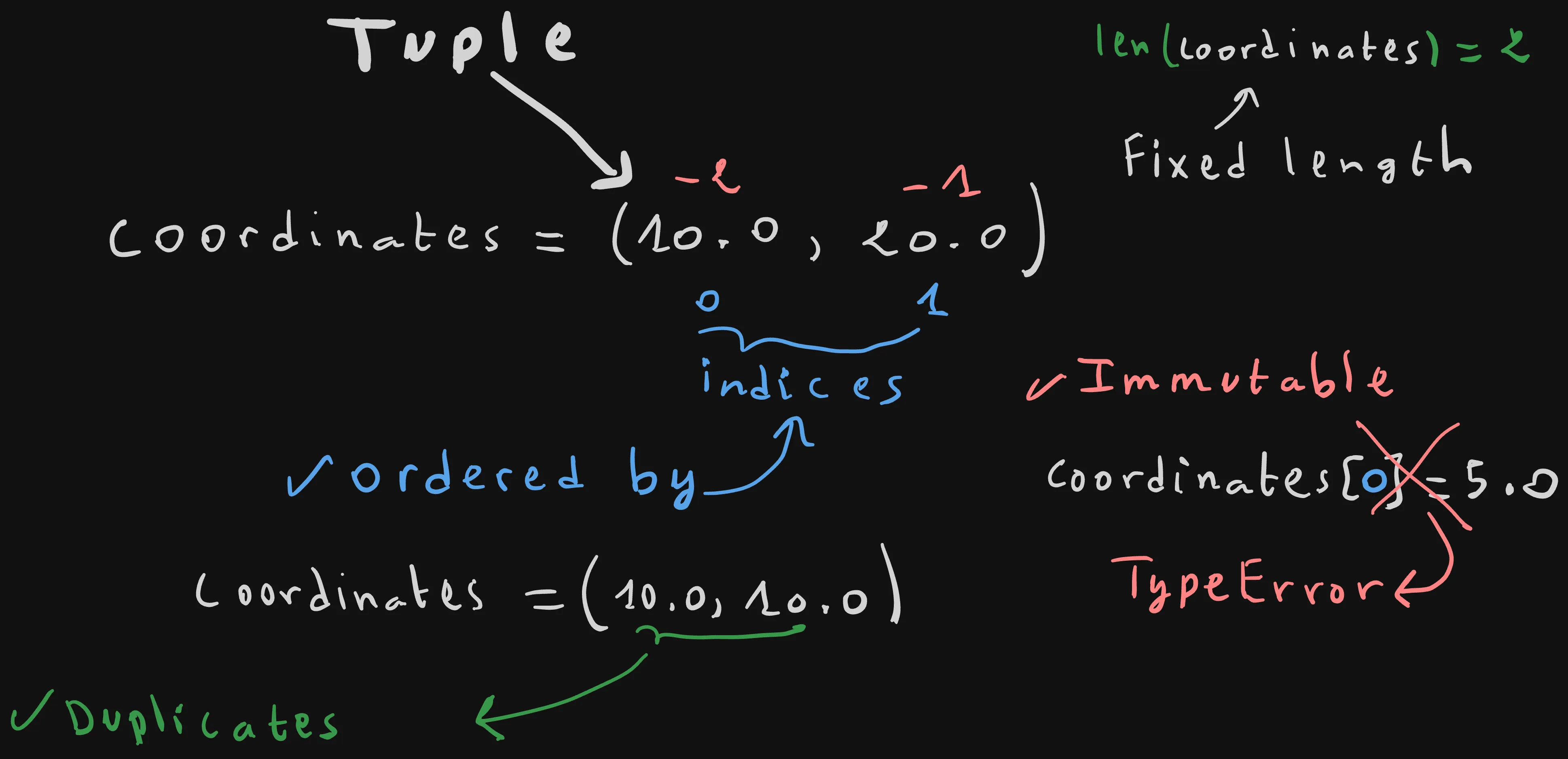
Tuples is a built-in data structure that are used to store multiple items, e.g 10.0, 20.0, in a single variable e.g coordinates.
You define a tuple by separating the items with a trailling comma, and then adding optional paranthesis around them.
coordinates = (10.0, 20.0) # Correct
# or
coordinates = 10.0, 20.0 # Correct
Single element tuples require a trailling comma, because otherwise it will be considered an int or any other value type within paranthesis.
It’s the trailling comma that tells the tuples not the paranthesis!
single = (42,)Characteristics:
Tuples in Python have the following characteristics:
Tuples Maintain items Order: as you can see from the image above, the items of a tuple are ordered by indices starting from 0.
In contrast with lists, tuples are immutable, which means that once a tuple is created, you can’t neither add, update, nor remove elements from it.
Basically once created, it acts as a constant that holds multiples values.
For example if you try to update the first coordinate of the tuple located at index 0 by assigning a new value 5.0 into it, a TypeError will gets raised.
coordinates = (10.0, 20.0)
coordinates[0] = 5.0 # TypeError: 'tuple' object does not support item assignment
The fact that tuples are immutable makes it possible for Python to optimize them, so in practice they are way faster than lists.
Tuples Allow Duplicates: Tuples allow duplicates or identical items, for example we can normally create a tuple of coordinates with two identical values.
coordinates = (10.0, 10.0) # Correct, no error gets raisedOperations on Tuples: Only Read
As tuples are immutable the only allowed CRUD operation is the R or reading.
The same indexing syntax used with lists can be used with tuples.
coordinates = (10.0, 20.0)
print("First coordinate: ",coordinates[0])
print("Last coordinate: ",coordinates[-1])
Slicing works perfectly on tuples, we covered slicing in details in the previous article of the series , you may consider checking it out if you haven’t read it after this one!
Tuple Unpacking
We saw that it’s possible to read the individual items of a variable using the indexing syntax.
coordinates = (10.0, 20.0)
print("First coordinate: ",coordinates[0])
print("Last coordinate: ",coordinates[-1])
In addition to that, Python makes it possible to unpack, or capture the values of the tuple in order into individual variables.
For example, let’s capture the first coordinate coordinates[0], and second one coordinates[1] into two variables x and y.
coordinates = (10.0, 20.0)
x, y = coordinates
print(x) # 10.0
print(y) # 20.0
Many Python features such as swapping two variables without the need of temporary one are made possible thanks to tuple upacking.
Let’s start by exploring the swapping feature!
Swapping two variables using Typle Unpacking
Tuples can be used to swap between multiples variables
a = 1
b = 2

print("a",a) # a 1
print("b",b)# b 2
print("After Swap")
a,b = b,a

print("a",a) # a 2
print("b",b) # b 1
This removes the need for a temporary variable tmp, thanks to Python’s unique tuple unpacking.
a = 1
b = 2

tmp = a
a = b
b = tmp
print(a) # 2
print(b) # 1
Returning Multiple values from a Function using Tuple Unpacking.
Later when we will learn about functions in this tutorial, you’ll see that tuples unlock a really cool feature in Python, which is the ability to return more than two values from a single function!
def min_max(nums):
    return min(nums), max(nums)

min, max = min_max([1,2,3])
print(min) # 1
print(max) # 3
Under the hood Python automatically packs the multiple returned values into a tuple, which makes it possible to later use tuple upacking to access the returned values individually min and max.
Summary
Creating a tuple
coordinates = (10.0, 20.0)
# or
coordinates = 10.0, 20.0- Parentheses are optional — the comma is what actually makes it a tuple.
- Ordered by zero-based indices, just like a list.
- Allows duplicate values.
Single-element tuple
single = (42,)- The trailing comma is required. Without it,
(42)is just the integer42wrapped in parentheses.
Immutability
coordinates[0] = 5.0 # TypeError: 'tuple' object does not support item assignment- Once created, a tuple can’t be modified — no adding, updating, or removing elements.
- This is what makes tuples faster than lists in practice.
Reading and slicing
coordinates[0]     # first item
coordinates[-1]    # last item
coordinates[1:3] # slice- Same indexing and slicing syntax as lists.
- Reading is the only supported operation — there’s no update or delete for a tuple’s contents.
Tuple unpacking
x, y = coordinates- Captures each element into its own variable, in order.
- The number of variables on the left must match the number of items in the tuple.
Swapping two variables
a, b = b, a- Swaps values directly, with no temporary variable needed.
Returning multiple values from a function
def min_max(nums):
    return min(nums), max(nums)

lo, hi = min_max([1, 2, 3])- Python automatically packs multiple return values into a tuple.
- Unpacking on the caller’s side retrieves each value individually.
Conclusion
We’ve seen how tuples give us an immutable alternative to lists, with mostly the same syntax for all list operations that are supported by tuples, and how tuple unpacking make swapping variables and returning multiple values from a single function possible without any extra boilerplate code.
Lists and tuples organize data by index or position, you find a value only if you know its index. But sometimes you want to instantly look up a value by a meaningful name instead of a numeric index.
That’s where dictionaries comes in.
Enjoyed this article?
I'm currently open to new roles, remote-first or international. If something resonated or you'd like to collaborate, I'd love to hear from you.

This article was originally published on https://sidaliassoul.com/blog/python-tuples-syntax-immutability-and-tuple-unpacking/. It was written by a human and polished using grammar tools for clarity.