Python Loops Masterclass: For-Range, While True, Break, and Continue

Last updated on
Introduction
A program can’t be turing complete without Loop control flow statements. In other words, in order to make our program useful and to avoid repeating ourselves everywhere, we need to be able to execute code repeatedly.
Many programming tasks envolve doing the same work over and over, such as waiting for user inputs in a game, processing collections of data, or simply executing a task as many times as needed or as long a given condition is not satified.
In this article, you’ll learn how to repeat code using for and while loops, control loop execution with break and continue, and understand when each looping construct is the right choice.
For
A for loop with range is used to execute a code block N times.
stop = 5 # Repeat the code block within the for statement 5 times!
for i in range(stop):
    print("Iteration",i)
Output:
Iteration 0
Iteration 1
Iteration 2
Iteration 3
Iteration 4 --> stop = 5, 5 is exclusive
Python is a zero based programming languages so the iteration index starts from 0, and stops at 4.
In this case range received a stop index stop equal to 5, the stop index is exclusive, that’s why our code stopped at the 4th iteration, instead of the 5th one.
After all the goal is to iterate stop=5 times, if you start counting from 0 to 4, you’ll find out that there are 5 total iterations.
Iteration 0  --> 1
Iteration 1  --> 2
Iteration 2  --> 3
Iteration 3  --> 4
Iteration 4  --> 5
You can also pass a start index to range, which is inclusive in contrast with the stop one.
stop = 5
start = 2

for i in range(start,stop):
    print("Iteration",i)
Output
Iteration 2 <---- start = 2
Iteration 3
Iteration 4 <-- stop = 5, 5 is exclusive
When not passed start defaults to a value of zero.
In addition to stop and start you can also supply range with a third argument called step, which defaults to a value of one if not passed.
range(start = 0,stop, step = 1)It represents the amount by which we increment the loop index i at each iteration.
For example, the code below prints all the even numbers between start=0, and end=10(exclusive).
Instead of incrementing index i by step=1 at each iteration, it increments it with a step=2, which results in printing all the even numbers between 0 and 10.
start = 0
stop = 10
step = 2

for i in range (start, stop, step):
    print("Iteration",i)
Output:
Iteration 0
Iteration 2
Iteration 4
Iteration 6
Iteration 8
While Loop
The previous even numbers example can be easily implemented with a while loop.
By initializing a start variable to zero, a stop one to 10, and a step one to 2.
In order to track the value of the index at each iteration, we will use an index i, similarly to how this latter is returned by range and provided for each iteration.
First, we need to initialize the index i to start.
Then write our while loop using the while keyword, followed by a stopping condition, which is in our case when the index i becomes strictly less than stop, because as you may recall the stop index is not inclusive (exclusive).
Within the while loop, or at each iteration, we increment the index i by the step amount
As long as the condition evaluates to True, the while loop will keep repeating the code block within it, as soon as it evaluates to False, the while loop skips that code, and then the program will continue executing whatever code sequentially as it’s used to(e.g. the print statement below the while loop).
start = 0
stop = 10
step = 2
# While loop
i = start

while i < stop:
    print("Iteration",i)
    i += step
print("While loop finished executing")
Output:
Iteration 0
Iteration 2
Iteration 4
Iteration 6
Iteration 8
While loop finished executing
While loops are particularly useful to keep iterating for an undefined number of iterations, while a given condition is still valid (True)
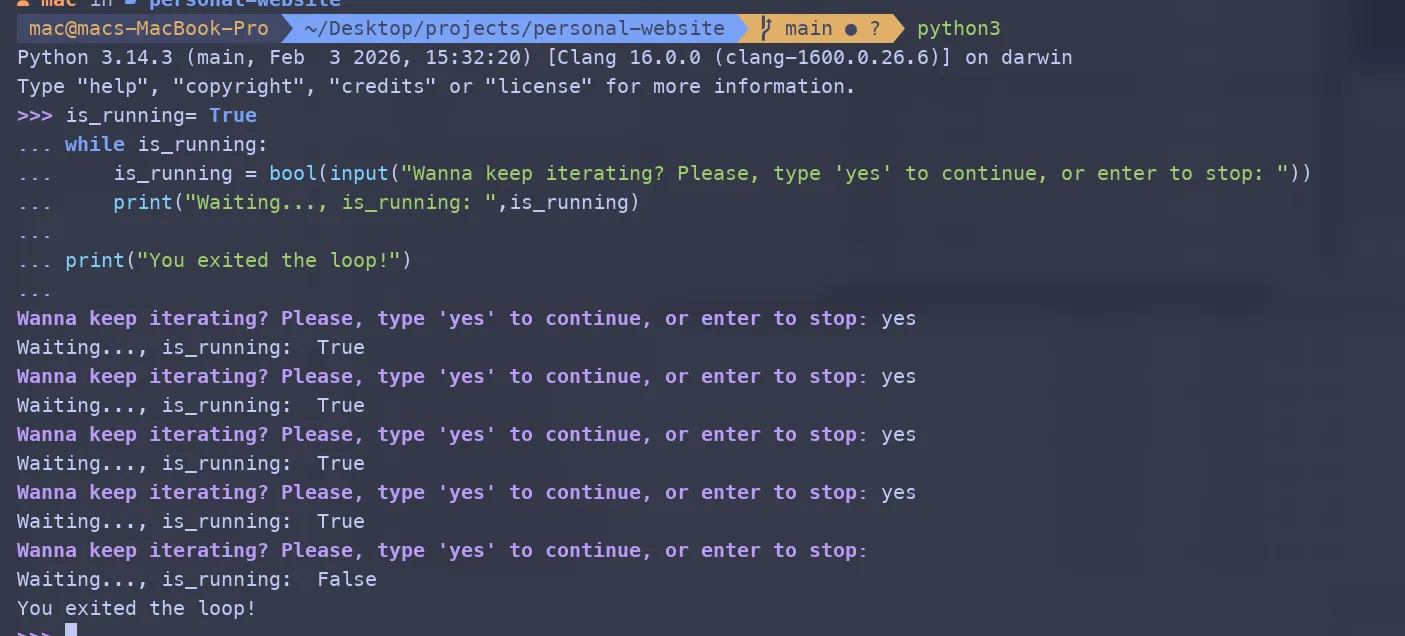
For example, in the code below, the while loop will loop will keep running forever as long as the boolean variable is_running is equal to True.
Inside the while loop, we use the input builtin, to wait for the user input, retrieve it as a string, and then convert it to a boolean using the bool type casting builtin.
Remember that in Python, empty strings are considered Falsy values, and any non-empty string will be considered as Truthy.
So as long as you type something, bool(input()) will evaluate to True, and if you type nothing, then it will evaluate to False.
is_running= True
while is_running:
    is_running = bool(input("Wanna keep iterating? Please, type 'yes' to continue, or enter to stop: "))
    print("Waiting..., is_running: ",is_running)

print("You exited the loop!")
Output:
In a real application such as a game for example, maybe you want to keep running the game loop until the player quits the game.
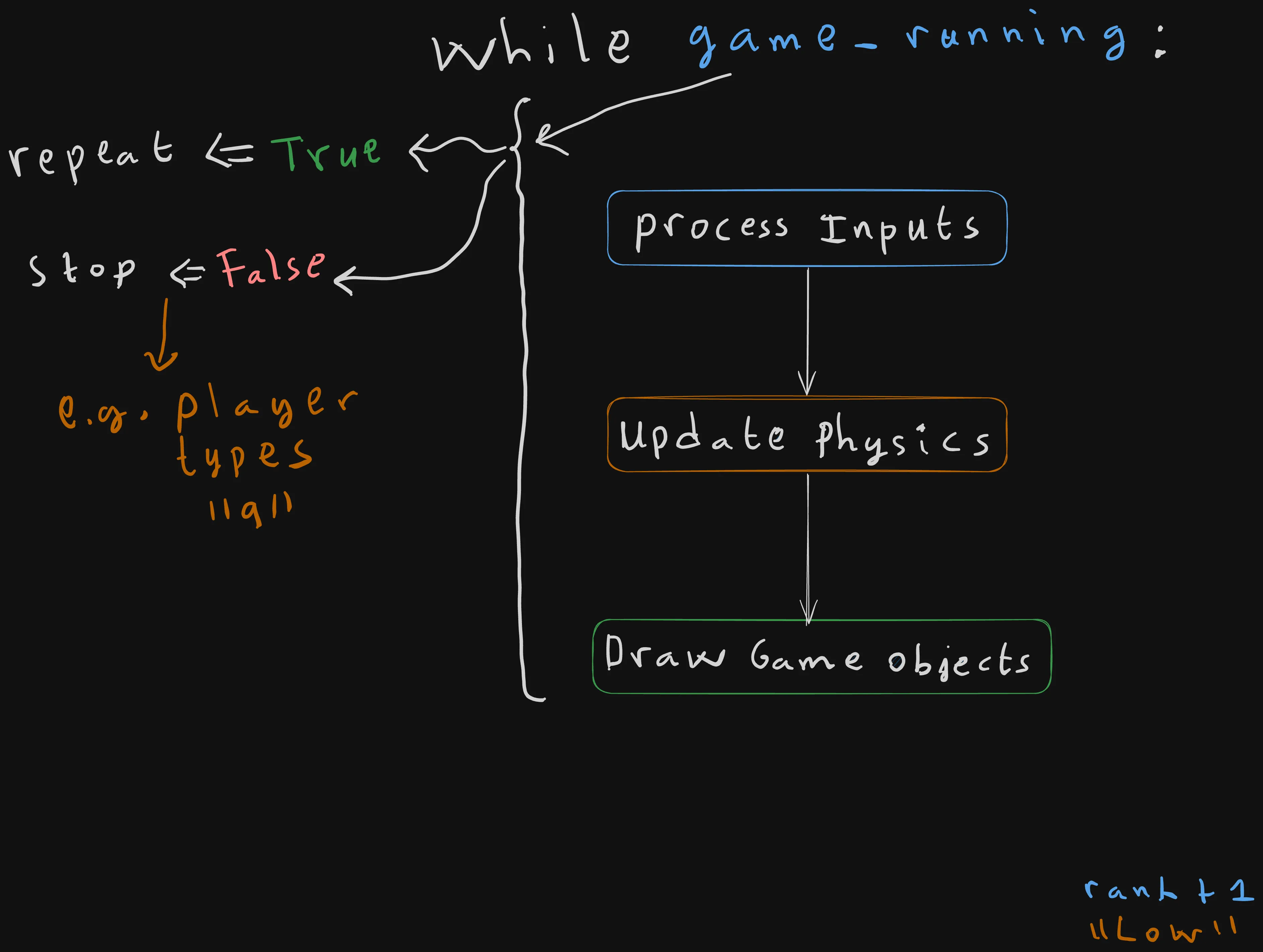
is_game_running = True
while is_game_running:
    print("Processing Inputs")
    print("Calculate/Update Physiscs")
    print("Drawing/Rendering game objects")
Output
Processing Inputs...
Calculate/Update Physiscs...
Drawing/Rendering game objects...


Processing Inputs...
Calculate/Update Physiscs...
Drawing/Rendering game objects...

... keeps printing the same sequence forever, until the player presses on "q" to quit the game.
Break and Continue
for i in range(10):
    if i == 3: continue
    if i == 7: break
    print(i)
Output:
0,1,2,4,5,6continue is used to skip a specific iteration(i == 3 in our case), and to immediately move to next one (i== 4).
It’s like saying “We are done with iteration 3, please increment i by one, and move to the next one.”
On the other hand, break tells the program to immediately quit the loop.
For example, in the above code, the loop stops at i==7, the print statement hasn’t executed as the loop is been quit immediately.
When using break with a for loop, Python provides a useful construct for-else, to execute code in case of the loop has completed without a break.
task_completed = False # Set to False, to quit at the first iteration.

for i in range(5):
    print("Iteration ",i)
    if  task_completed == False: # Break immediately when task_completed= False(you can also write the condition as not task_completed)
        break
else:
    print("Task completed, without a break") # Gets printed when task_completed is set to `True`.
Output when task_completd=True:
Iteration  0
Iteration  1
Iteration  2
Iteration  3
Iteration  4
Task completed, without a break
Output when task_completd=False:
Iteration 0Break and Continue with a while loop
It’s also possible to use continue and break with a while loop, but usually only break is used with it.
While with the continue Keyword
We can normally use break as we did previously with the for-loop.
for i in range(10):
    if i == 3: continue
    if i == 7: break
    print(i)
But there is a catch that you need to be aware of when using continue.
You need to manually increment i, or the loop will get stuck forever at iteration i == 3.
i = 0
while i < 10:
    if i == 3:
        #Infinite loop trap
        i+= 1
        continue
    if i == 7: break
    print(i)
    i += 1
Output:
0,1,2,4,5,6The while loop runs for 10 iterations, starting from index 0 to index 9(10 is exclusive).
Inside the while loop’s body, we use continue to skip over the third iteration. But just before doing that we need to manually increment i by three to avoid creating an infinite loop that gets stuck at iteration i==3.
At iteration (i==7), we use the break keyword to quit the loop imediately, which explains why 7 didn’t get printed, even though the loop got quit at iteration i==7.
While with the break Keyword
It’s especially usefull when we want to break out of a loop without having to use a boolean variable that is declared outside the loop. We can re-write our previous example, without a boolean variable.
we replace the is_running boolean with a value of True to make the loop run infinitely, while adding a condition within the while loop.
The condition checks whether the is_running variable is equal to False( which happens when the user types nothing and presses Enter right away). Within the condition, we simply use the break keyword to quit the loop immediately
while True:
    is_running = bool(input("Wanna keep iterating? Please, type 'yes' to continue, or enter to stop: "))
    print("Waiting..., is_running: ",is_running)
    if  is_running == False:  # or can be written: not is_runnig
        break

print("You exited the loop!")
Summary
for Loop
- Usefull to repeat executing a block
Ntimes.
for i in range(stop):
    ...

for i in range(start, stop):
    ...

for i in range(start, stop, step):
    ...
range(start, stop, step)
start(inclusive, default =0)stop(exclusive)step(default =1)
while Loop
while condition:
    ...
A while loop keeps executing a code block within it, as long as its condition evaluates to True.
Use it when the number of iterations is not known in advance.
Infinite Loop
while True:
    ...
It’s Commonly used for long-running applications (games, servers, CLI tools, event loops, …).
Usually it’s exited with break.
break
breakImmediately exits the nearest loop.
continue
continueSkips the current iteration and move directly to the next one.
When used inside a
whileloop, make sure the loop variable is updated beforecontinue, otherwise the loop may never stop running.
for-else
for item in items:
    if condition:
        break
else:
    ...
The else block executes only if the loop finishes normally, without encountering a break.
Conclusion
Now that we learned how to make our program smarter by repeating code many times or as long a given condition is not satisfied, and explored a bunch of looping constructs such as for, while, break, continue, and for-else, along with where every looping technique is better used.
We’ll apply these techniques to our first and one of Python’s most commonly used data structures: lists.
You’ll learn how to create, modify, traverse, and slice lists efficiently.
Continue to Python Lists Ultimate Guide: From CRUD Operations to Advanced Slicing →
Enjoyed this article?
I'm currently open to new roles, remote-first or international. If something resonated or you'd like to collaborate, I'd love to hear from you.

This article was originally published on https://sidaliassoul.com/blog/python-loops-for-range-while-true-break-continue/. It was written by a human and polished using grammar tools for clarity.