Understanding Python Basic Data Types, Dynamic Typing, and Variable Rules

Last updated on
Introduction
Every program out there is basically a set of instructions and data,
the data part of it is stored using variables.
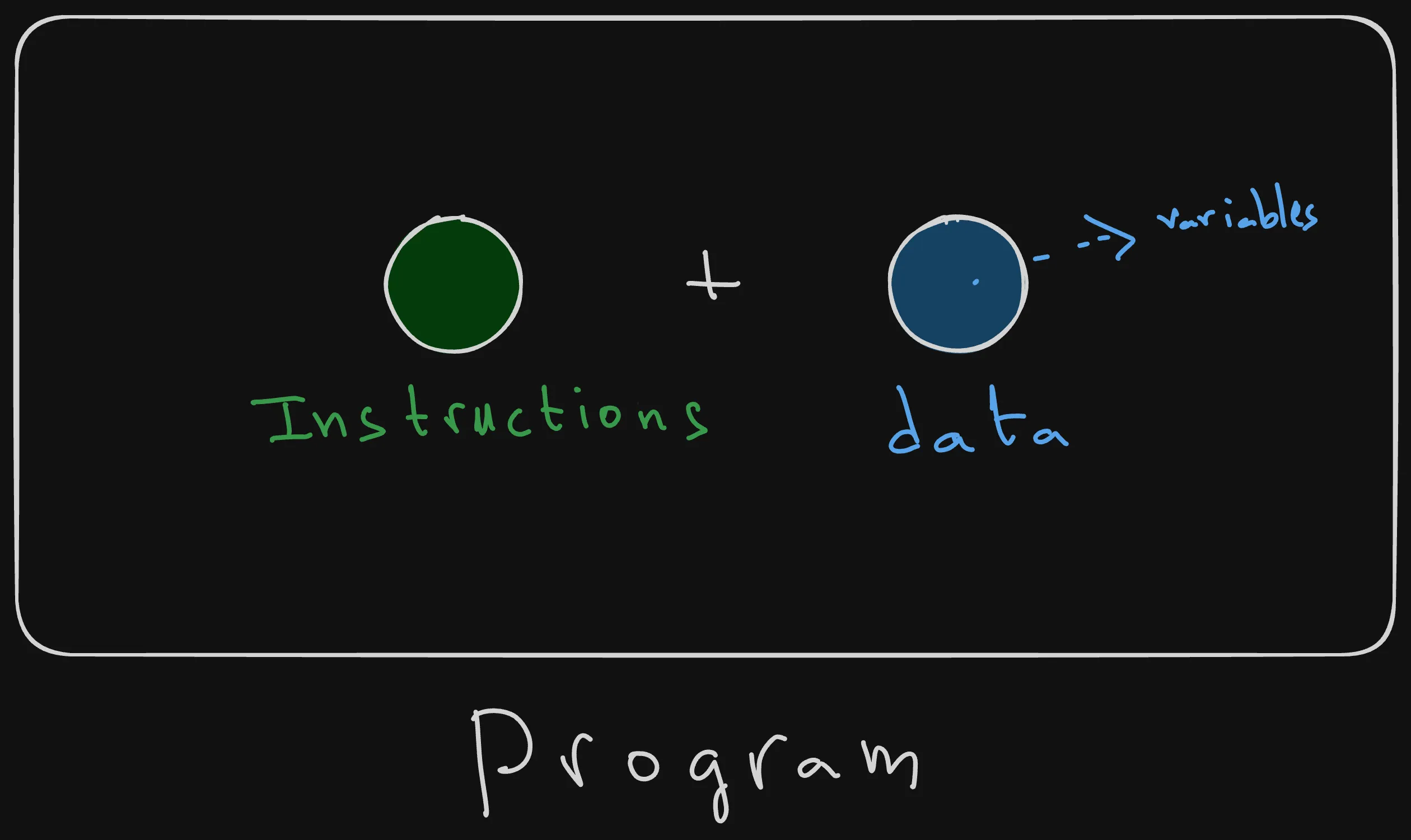
You can picture variables as a slate or a mini-whiteboard that can hold a value of a specific type, and be erased and replaced with another data type anytime in the program’s execution life cycle, thanks to Python’s dynamic typing.
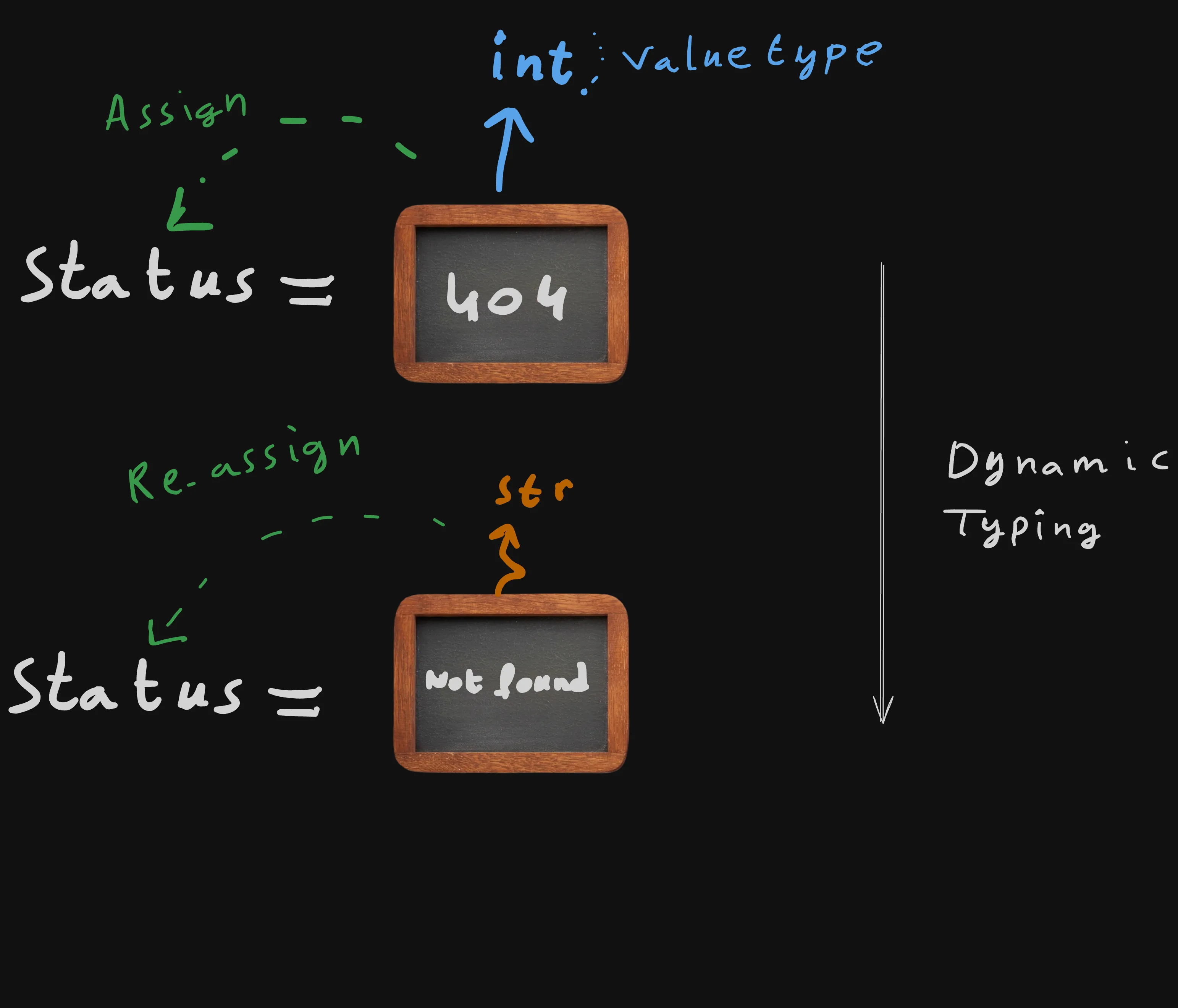
In this article, we’ll explore Python’s basic data types, learn how variables and constants work and behave, check value types at runtime, and perform both explicit and implicit type conversions.
Basic Value Types
Python is a dynamically typed languages, which means that its variables don’t have declared types, but values assigned to those dynamic variables do.
Let’s go through some of the basic value types in Python.
Integers:
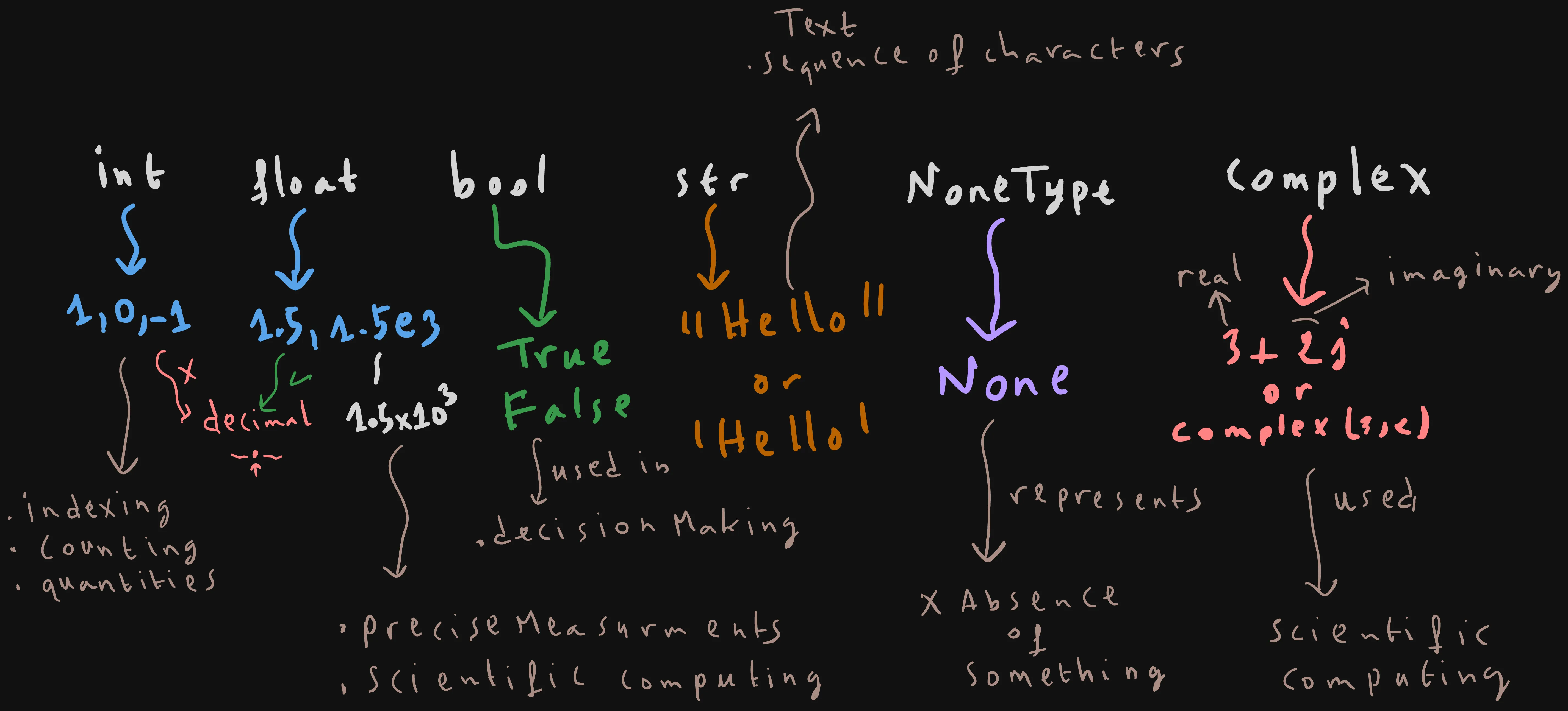
Integers are positive or negative numbers without a decimal point. They are typically used to count items, index data structures, define quantities, and so on.
print(1) # 1
print(type(1))

print(0.0) # 0

print(type(0.0))
print(-1) # -1

print(type(-1))
As you can see here, integers in Python, are signed, they can be either negative, positive or equal to zero.
Floats:
Floats represent “floating-point” numbers, which are basically numbers containing a decimal point. The decimal point divide the number into two parts (e.g 55.23).
- The integer part (or whole number part): 55
- The fractional part(or decimal part): 23
print(type(0.75)) # 0.75
print(1.5e3) # 1500.0
Floats are usually used for precise measurements, percentages, or scientific calculations.
Booleans:
Booleans are values that represent logical states, and can only hold one of the two values: True or False.
They are used in decision making and conditional logic.
print(type(True)) # True


print(type(False)) # False
Strings:
Strings are sequences of characters wrapped in quotes ' or double quotes ".
They are used to store text, such as the “hello, World!” text, that we printend before.
print("Hello, World!")Complex Numbers
Complex numbers represent pairs of real and imaginary parts. Mostly they are used in physics, electrical engineering, data science or any other advanced math applications.
Mostly you won’t encounter them in everyday’s code.
print(2 + 3j) # (2+3j)

# Or using complex(real_part,imaginary_part)

print(complex(2, 3)) # (2+3j)
NoneType:
NoneType has exactly one value: None.
It is used as a placeholder to signal the absence of a value. Think of it as the “none presence” or absence of a value.
print(None) # None

print(type(None)) # None
Variables
Variables are labeled or named containers storing values,
you can store any data inside a variable, and your program will remember it whenever you try to reuse it by mentioning the label.
You can imagine a variable as a slate or a mini-whiteboard that holds a value.
You can at any time erase the mini-white board, and change the stored value. For example here we are reassigning the status variable a value of 404.
That’s why they are called variables, because the data inside them can vary or change during the program’s execution.
For example, let’s declare a variable “status”, assign an int value of 400 to it, and then print it.
After that, we re-assign or change the value of the variable “status” to a value of the same type 404, and then print it again.
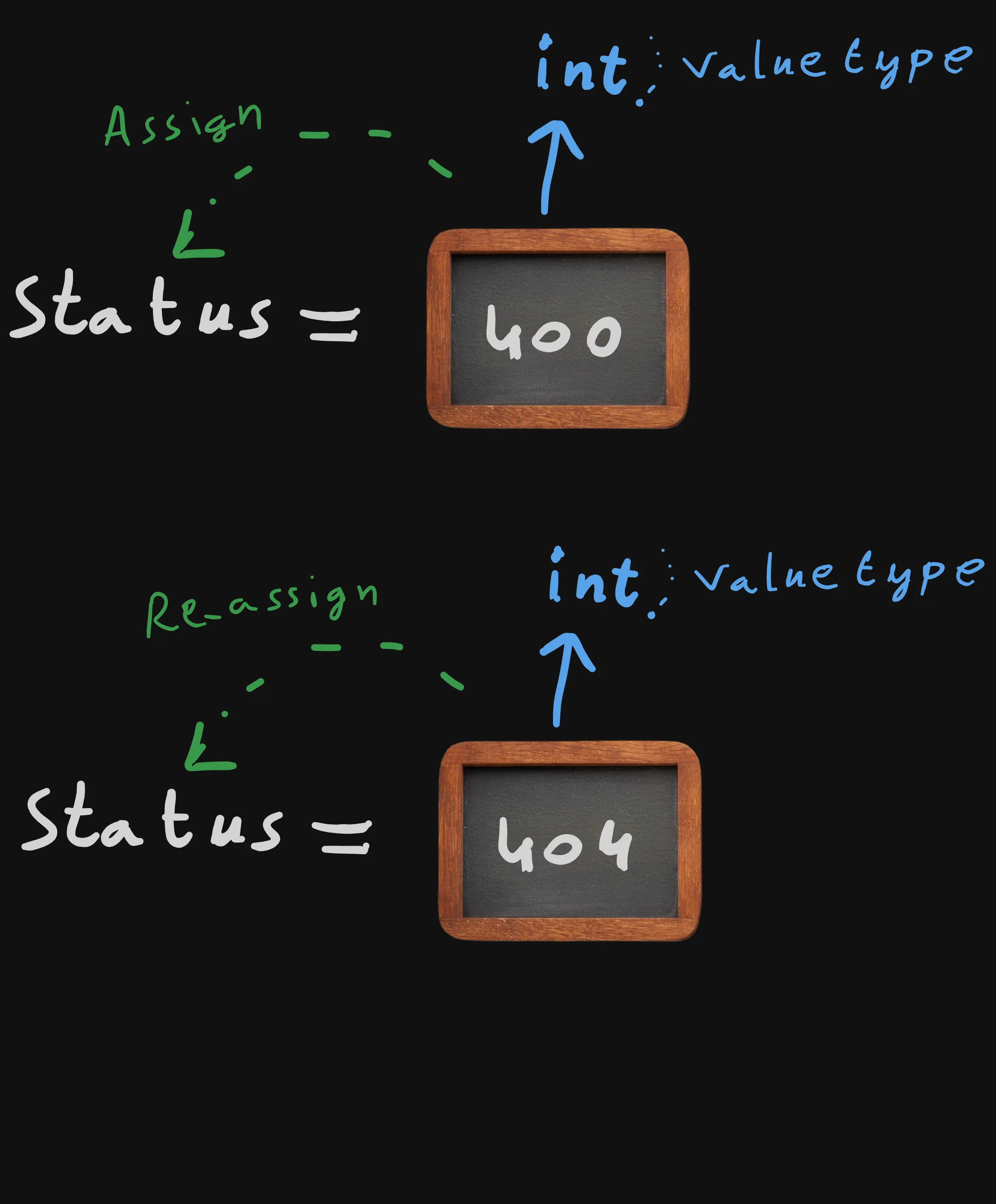
status = 400
print(status) # 400
status = 404 # 404
print(status)
In other languages such as C++, C or golang. A variable’s value type, should be declared once, and never change at runtime.
But python in contrast is dynamically typed, which means that a variable status can be assigned an int, and then re-assigned a string without any problems.
status = 404

print(status) # 404

status = "Not Found"

print(status) # Not Found
When labeling or naming your variable, you can’t just name it anything,there are a few simple rules that need to be followed:
- It should never start with a number e.g. “1player”.
- You should not use spaces to separate the words, use underscores instead, e.g. “user_name”.
- Python is case sensitive, which means that python sees “AGE”, “Age”, and “AGE” as three completely different variables.
Constants
Python Does not have builtin constants like other languages. So most programmers typically use the naming convension of capitalizing the variable name, for example:
PI = 3.14159
ENDPOINT = "http://localhost:3000/products"
Python allows re-assigning any value to the constants, as they are nothing more than ordinary variables.
Most developers are familiar with this convension, but there is no garantee that your constants will remain unchanged.
The capitalization acts like a signal that tells developers that it’s a constant, and that it should never be changed.
Type Checking
Let’s declare 5 variables title, task_id, progress, done, and task of value types: “str”, “int”, “float”, “bool”, and “NoneType” respectively.
It’s possible to check the type of a variable dynamically using the “type” function.
title = "Buy grouceries"
task_id = 1
progress = 0.75
done = True
task = None


print(type(title)) # <class 'str'>
print(type(title) == str)
print(isinstance(title,float))
print(type(task_id)) # <class 'int'>
print(type(progress)) # <class 'float'>
print(type(done)) # <class 'bool'>
print(type(task))# <class 'NoneType'>
As you can see printing the type of a variable, result in displaying its type wrapped in some tag named “class”: <class 'str'>, <class 'int'>, and so on.
The reason is that unlike other languages that have premitive types, Python treats everything as a class or an object of a class.
We will learn more about classes later, all you need to know for now, is that classes are types or blueprints for creating objects. For example, the string value “Hello” is an object instance that is created from the “str” class.
To check wether a variable’s type is an ‘str’ or any other type… We simply compare the returned value of “type(variable_name)” with the builtin “str” class using the comparison operator ==.
print(type(title) == str) # True
It’s also possible to use the “isinstance” builtin function, to check wether the value inside the title variable is an instance of the “str” class or not. This is equivalent to comparing the type of “title” with “str”.
print(isinstance(title,str)) # True“isinstance”, “type”, “str”, “float”, “bool” and other builtin classes/types belong to the builtins module (or namespace), that gets loaded automatically by the Python interpreter.
You can confirm that by yourself by running the following code.
print(isinstance.__module__) # builtins
print(type.__module__)# builtins
print(str.__module__)# builtins
Type Casting
Explicit (Manual)
print(str(2)) # "2"
print(str(3.14)) # "3.14"
int("24") # 24
float("3.14")

bool("") # False
bool(0) # False
bool(50) # True
bool(-50) # True
Implicit (Automatic)
result = 10 + 2.5  # int + float
print(result,type(result)) # 12.5 <class 'float'>
Summary
Basic Data Types
| Type | Example |
|---|---|
int | 42, -10 |
float | 3.14, 1.5e3 |
bool | True, False |
str | "Hello" |
complex | 2 + 3j |
NoneType | None |
Variables
status = 404
status = "Not Found" # Re-assigning a different type is fine, Python is dynamically typed!
Constants (Convention)
PI = 3.14159 # Upper case variables, only conventional
API_URL = "https://example.com"
Type Checking
type(value) # <class 'type of value'>
isinstance(value, str) # True or False
Type Casting
str(10) # "10"
int("42") # 42
float("3.14") # 3.14
bool(0) # False
Key Notes for Interviews
- Variables are names that reference values, and their values can change during execution because Python is dynamically typed.
- There are no real constants in Python, so developers use the naming convension of declaring the constants by creating an upper-cased variable. Anyone can change it’s value, but the naming convension signals that no one should.
- You can use
type()orisinstance()to inspect a value’s type at runtime. - Type casting can be explicit (using
int(),float(),str(),bool()) or implicit (performed automatically by Python in compatible expressions) as we saw previously.
Conclusion
Now you know how Python represents data with value types, how variables store those values, and how dynamic typing allows a variable to hold different types throughout the execution of a program.
But knowing that alone is not enough as you need to actually do something with these laters.
That’s where the next video comes in, where we will learn about how you can manipulate those values using arithmetic, comparison, logical, and assignment operators.
Continue to Mastering Python Operators: From Basic Arithmetic to Shorthand Syntax
Enjoyed this article?
I'm currently open to new roles, remote-first or international. If something resonated or you'd like to collaborate, I'd love to hear from you.

This article was originally published on https://sidaliassoul.com/blog/understanding-python-basic-data-types-dynamic-typing-and-variable-rules/. It was written by a human and polished using grammar tools for clarity.